Learning to Use Sharing Tools in the Fiberarts Community

by artemisnorth | Apr 25, 2024 | uncategorized | 0 comments

There comes a point in far too many small business websites where the whole thing stops feeling like a useful tool and starts feeling like the kitchen junk drawer.

You know the one.

You open it looking for one thing and suddenly you’re elbow-deep in dead batteries, mystery keys, elastic bands, expired coupons, two pens that do not work, and a screwdriver that apparently lives there now for reasons no one can explain.

That is a lot of small business websites.

And if your website feels weirdly hard to update, manage, or trust, the problem may not be you. It may be that the site has become cluttered, outdated, or structurally messy over time.

You go in to fix one tiny thing. Change a sentence. Swap a button. Update a date. Add a link. Nothing dramatic.

Cute.

Forty minutes later, you’re wandering through old pages, duplicate drafts, weird settings, mystery plugins, and images named things like final-final-2-reallyfinal.jpg, wondering which version of past-you made these choices and why she was allowed near the controls.

That is not a discipline problem.

That is a structure problem.

When your website starts fighting back

A lot of people assume website stress means they are disorganized, bad at tech, behind on everything, or somehow failing at adulthood.

Usually, that is not what is going on.

Usually what happened is much less dramatic and much more annoying.

The website grew.
The business changed.
Offers shifted.
A new page got added.
A tool got bolted on.
Something broke.
Something got patched.
Something got ignored because you were busy and it seemed fine enough at the time.

Which, to be fair, is how a lot of business decisions get made when you are one person trying to do seventeen jobs and occasionally eat lunch.

So no, this does not mean you ruined your website.

It usually means the site has been collecting layers.

And layers create friction.

Not all at once. Just steadily. Quietly. Like digital plaque.

What a messy small business website actually looks like

The sneaky part is that it does not always look terrible from the outside.

Sometimes the homepage still looks perfectly decent. Sometimes the branding is nice. Sometimes the site even works well enough that nobody is actively screaming.

The trouble usually shows up behind the scenes.

It looks like this:

  • too many old pages hanging around because you are afraid to delete the wrong one
  • blog categories that made sense once and now mostly raise questions
  • plugins you no longer use but do not quite trust yourself to remove
  • settings buried in seventeen different places for no good reason
  • duplicate images and mystery files breeding quietly in the media library
  • pages you avoid editing because every time you touch them, something gets weird
  • a backend that turns every “quick update” into a whole production

And here is the part that matters:

When your website is hard for you to manage, it often becomes harder for visitors to use too.

Not always in a big flashing-error way.

Sometimes it shows up as clutter, confusion, inconsistency, dead ends, outdated information, missing context, or just that faint but unmistakable feeling of, “Hm. Something here is a little janky.”

People may not know exactly what is off.

They just feel the drag.

The hidden cost of website clutter

A website junk drawer does not just waste time. It eats momentum.

Every small update starts to feel mildly cursed. You put things off, avoid publishing, and start dreading tasks that should be simple.

That is the real cost.

Not just the mess itself, but the mental drag of a tool that quietly trains you to avoid using it.

That is how a business website turns into background stress.

It is the same kind of low-grade friction that shows up in other parts of running a business too. Small things are not always small when they keep draining time, attention, and energy. You can explore more of that in the Business & Workflow section of the site.

Why simple website cleanups turn into bigger jobs

Sometimes you think you are doing a quick little website tidy.

Delete a few things. Clean up a page or two. Be responsible. Feel accomplished.

Adorable.

Because once you start pulling at the threads, you often realize the clutter was not the whole problem.

The clutter was just sitting on top of bigger structural issues.

Old content overlaps with current offers.
Page hierarchy stopped making sense somewhere around three pivots ago.
Images are missing proper names or alt text.
SEO details were never actually finished.
Accessibility got patchy.
Navigation evolved by accident instead of on purpose.

So what looked like a bit of housekeeping turns into a real audit.

Annoying? Yes.

Useful? Also yes.

Because now you are finally seeing what the website has been trying to tell you with all its weird little acts of resistance.

I wrote about that kind of domino effect more directly in How a Website Cleanup Turned Into an SEO and Accessibility Audit.

Signs your website needs a cleanup

Here are a few.

Small edits take way too long

You should not need a snack, a pep talk, and a support ferret to update one section of a page.

You are never fully sure what is live

If you have to squint at your own website like a suspicious Victorian aunt, something is off.

You keep finding outdated pages or half-finished bits

That usually means the site has grown without a clean structure underneath it.

You avoid touching parts of the site

Not because you are lazy. Because you do not trust what will happen if you breathe on them.

The backend feels heavier than it should

Too many decisions. Too many steps. Too many places for things to hide and wait for you like little goblins.

If several of these sound familiar, you do not have a motivation problem.

You have a website friction problem.

What to do first

You do not need to fix the whole thing in one dramatic burst of digital righteousness.

Please do not do that to yourself.

Start smaller.

1. Figure out what actually matters now

What pages, offers, and content are still relevant to the business you have today?

Not three rebrands ago. Not two pivots ago. Not that lovely idea you had in a fit of optimism and never fully used.

Now.

2. Identify the obvious clutter

Old pages. Duplicate drafts. Unused images. Abandoned ideas. Expired announcements. Offers you do not even want anymore.

You do not have to delete everything immediately. This is not a purge montage.

But you do need to know what is taking up space.

3. Map the core structure

What are your main pages?
What do visitors most need to find?
What do you most need to update regularly?

That gives you a practical picture of what the site is actually supposed to support.

4. Notice where you feel resistance

Which tasks always feel more annoying than they should?

That is usually where the mess is costing you the most.

Pay attention to the spots that make you sigh before you even click. Your nervous system knows things.

5. Stop treating every website problem like a personal flaw

A messy website is usually what happens when a real business grows in real time and nobody gets around to rebuilding the plumbing because they are busy trying to run the actual business.

That is not a character defect.

That is maintenance catching up with you in ugly shoes.

Your website is supposed to support the business

Not haunt it.

Not confuse you.

Not punish you for trying to update a sentence.

A website does not need to be perfect. It does not need to be massive. It does not need a thousand bells, whistles, and dashboard goblins demanding snacks.

It does need to be usable.

Clear enough that visitors can find what they need.
Clean enough that you can manage it without losing the will to live.
Structured enough that it supports the business instead of creating more drag around it.

That is the real goal.

Not perfection.

Usability.

Because a business website should feel like a tool.

Not an escape room.

Final thought

If your website feels harder to manage than it should, the answer is probably not to shame yourself into “being better at it.”

The answer is to look at the structure, the clutter, the outdated bits, and the friction points, and start untangling what is actually going on.

Because your website should not feel like a drawer full of mystery wires, expired coupons, and decisions made by a sleep-deprived raccoon.

It should feel like something you can use without needing emotional backup.

And honestly, that is not asking too much.

If your website feels harder to update, manage, or trust than it should, that is exactly the kind of mess I help untangle in TechAlchemy. Get in touch here and we’ll look at what is clutter, what is broken, and what to fix first.

Learn how to share:

The Fiberarts Community is open and ready for you! Sign up for the Beyond the Skein newsletter to get all the details about our Grand Opening.

Check out  tutorial #1 on the Fiberarts Community page—it'll guide you into the space and show you how to navigate from room to room.

Let's dive into using those cool tools I mentioned! By the end of this post, you'll be able to Use the Circle Cam and the Presenter Cam. You'll be sharing your screen, Google Docs,and files like a pro with your fellow Fiberartists.

How to Use Your Camera
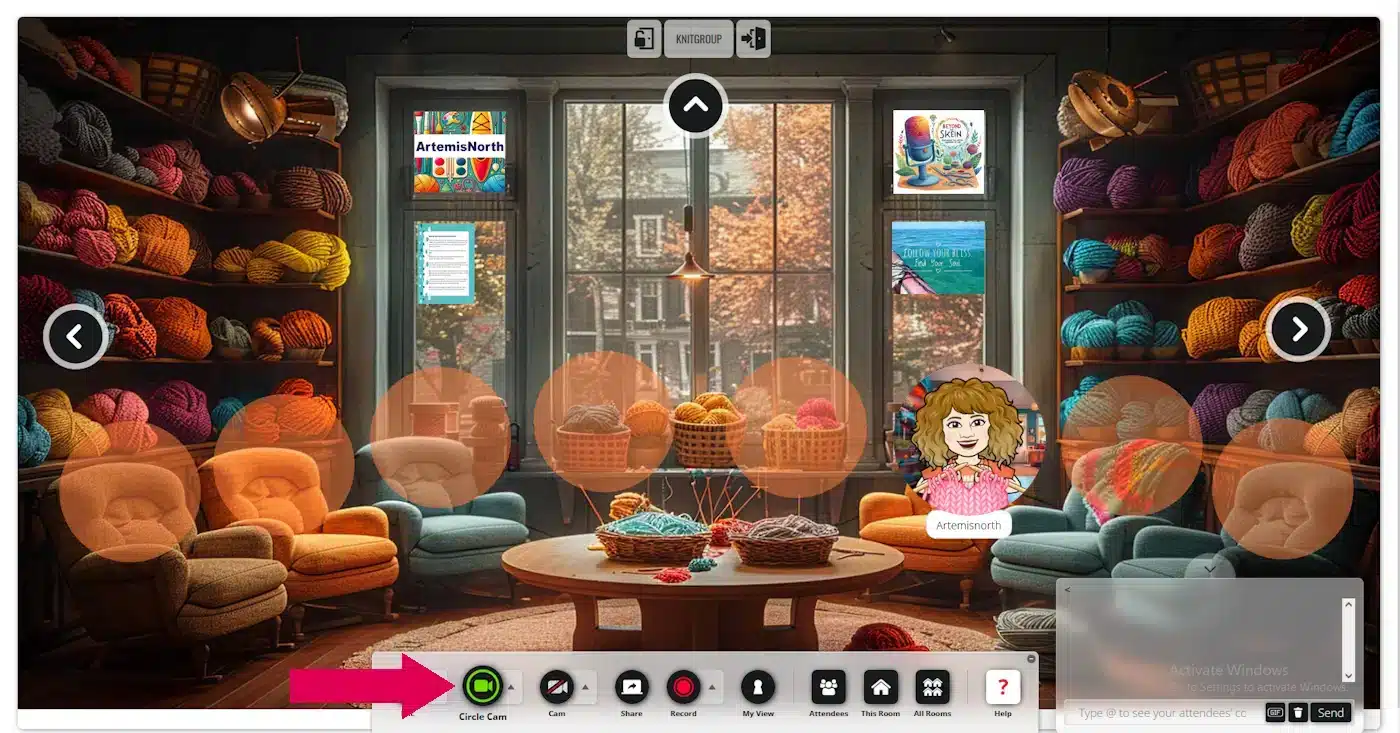
Using the Circle Cam is a breeze! When you first entered the space, you were likely prompted to use your camera. While not everyone chooses to activate it, if you want to use it, simply click on the "Circle Cam" button located in the toolbar at the bottom of the screen.

If you'd like to turn off your circle cam just click on the button again. Easy peasy.

camera circle

I'm really excited about the "Presentation Cam"! It's such a useful tool. Recently, a friend and I used it in the Whisperspace to work out a new stitch together. It was fantastic—I could see her work and she could see mine, which helped us figure it out in no time! I think you'll find this feature incredibly handy.
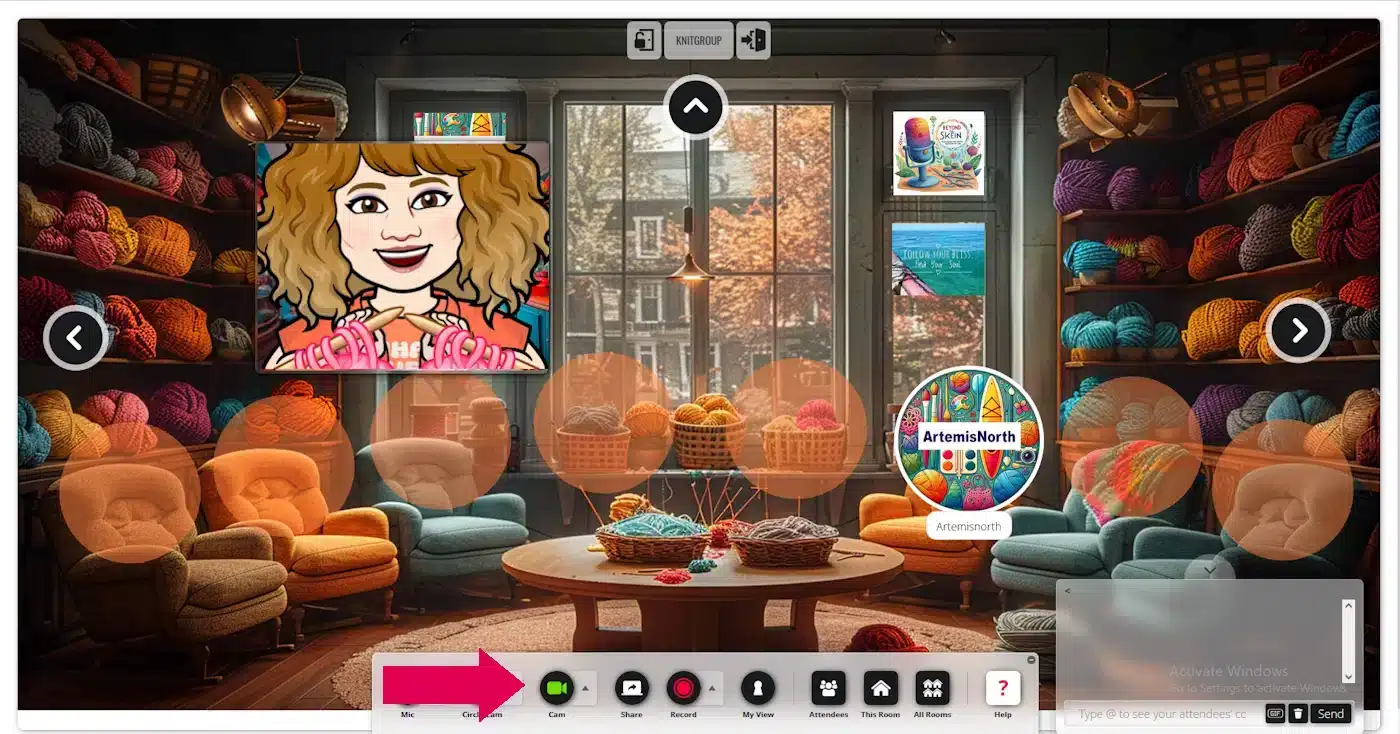
 

To use the Presentation Cam, simply click on the circle labelled "Cam." Once it opens, you can resize it by dragging a corner. To move the cam window, place your cursor in the centre until the four-arrow icon appears, then drag the window to your desired location on the screen.

camera presenter

To deactivate the presenter cam, simply click on the "Cam" button once more.
- Back to Top -

Screen Sharing

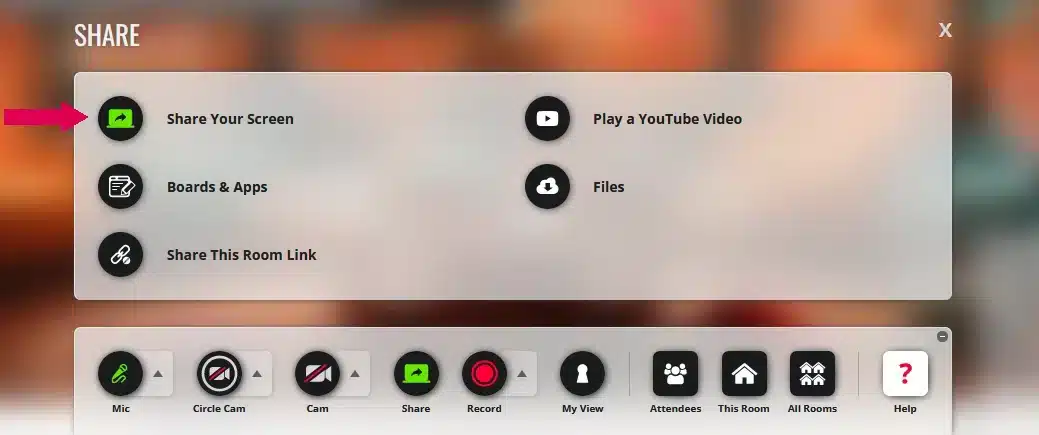
Sharing your screen allows you to collaborate directly on the same pattern, demonstrate chart-making, show how to use an app, or share anything else you want your friends to see. Simply click on the circle that says "SHARE" to the right of your Cam. Then click on "Share Your Screen".

screen share off

Please be aware: Your toolbar will have fewer items than mine, as I am the administrator. 

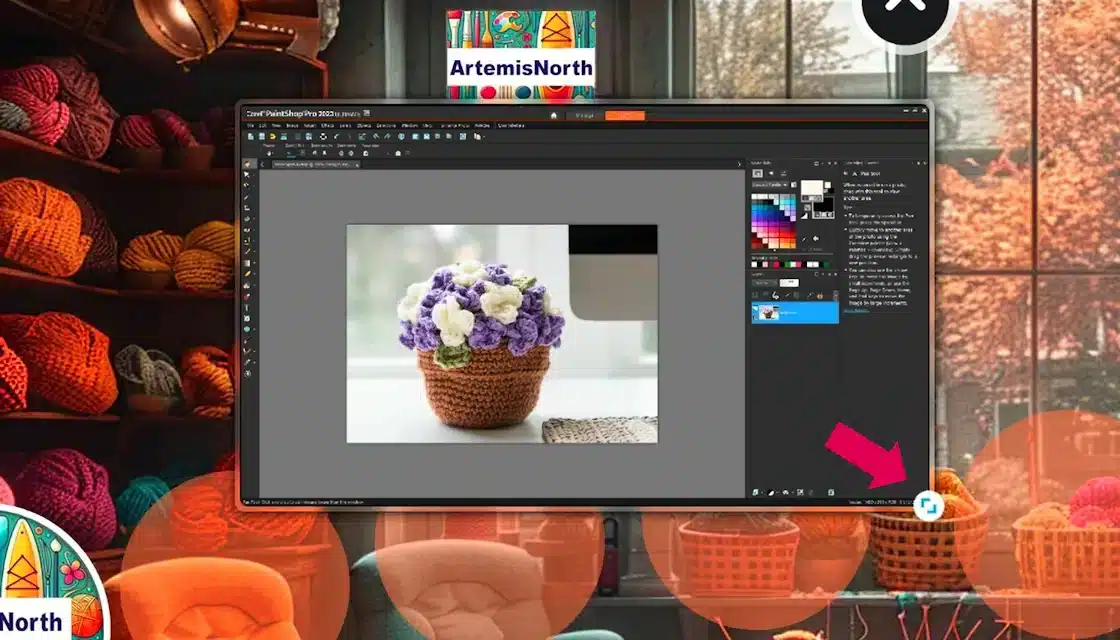
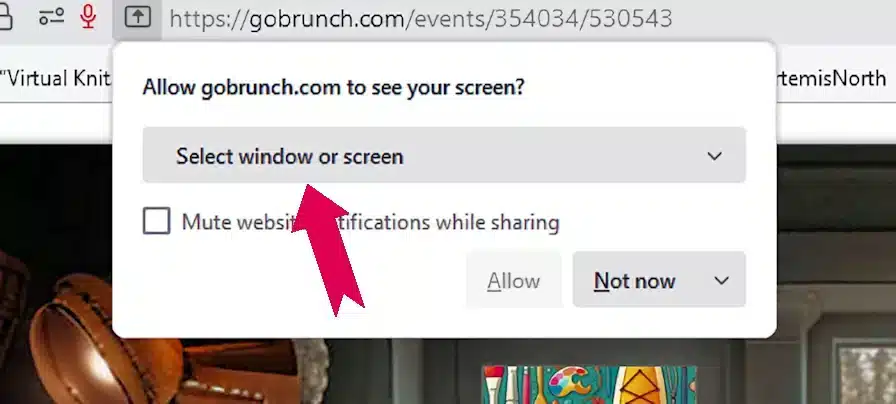
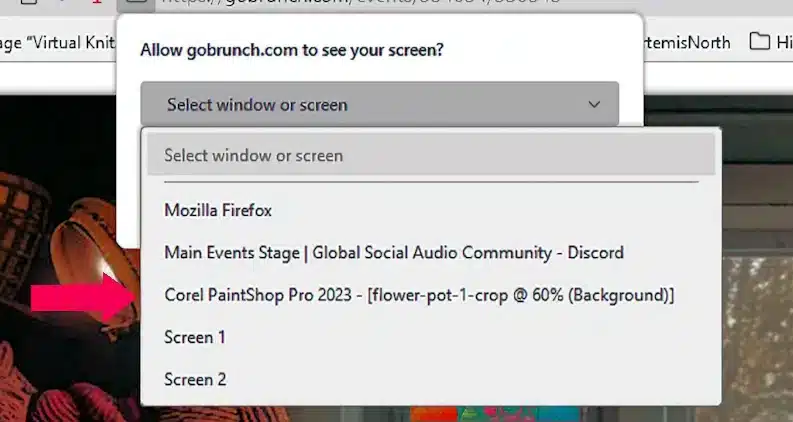
Next, click on "Select window or screen." A drop-down menu will appear, showing all the screens or apps available to you. For example, if you want to share a picture you're working on in PaintShop Pro, just click on that option.
allow screen
select screen

Voila! You're now sharing your screen. To resize the window, just click and drag the double arrow, indicated by the pink arrow, to your preferred size. If you need to move the window, simply click on it and drag it to your desired location.

screen shared

To stop sharing your screen, click the “Share” circle once more, and it will deactivate.
- Back to Top -

Sharing Google docs

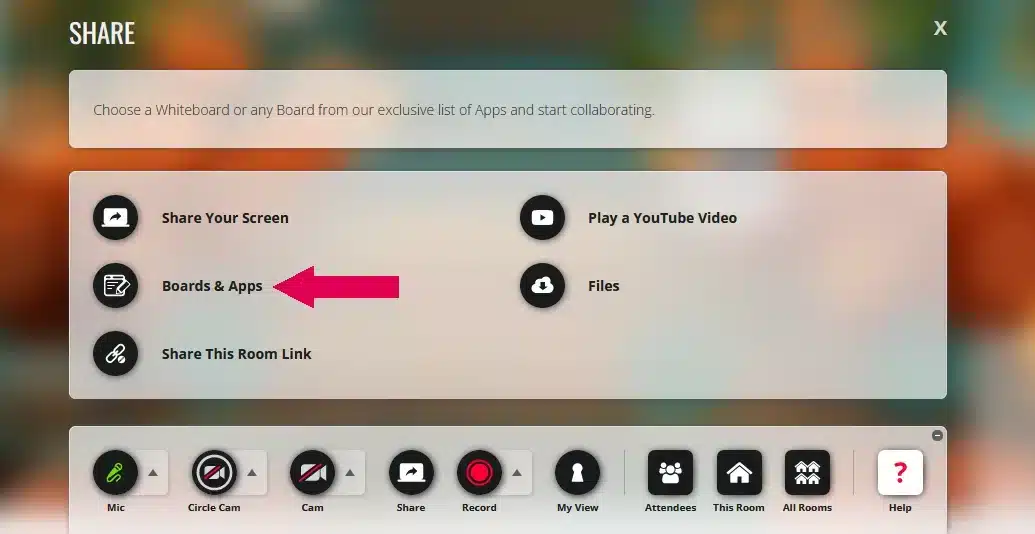
To share your Google documents, just click on the "Share" circle like before. When the menu appears, select "Boards and Apps," which is indicated by the pink arrow.

gdocs share

Please remember: before you can share Google Docs, spreadsheets, and other files, they need to be set to public sharing. Log into your google docs account, click on the document you want to share. You can adjust the visibility settings by clicking on the "Share" button in your Google Docs as shown by the pink arrow.
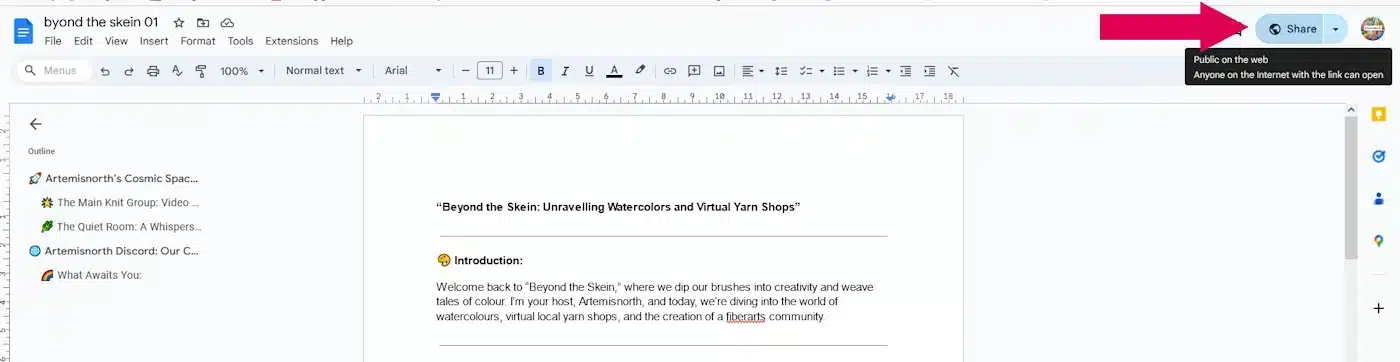
google doc indocs

A small window will pop up. Below your name and email address you will see the "General" heading with a drop down menu below. Click on the menu and choose "Anyone with the link". You've just set your document to pubic but only people with the link can see it. (This can easily be reversed by logging into google docs and using the "Share" button.

Simply click on the "Copy Link" button and then the blue "Close" button to exit this window.
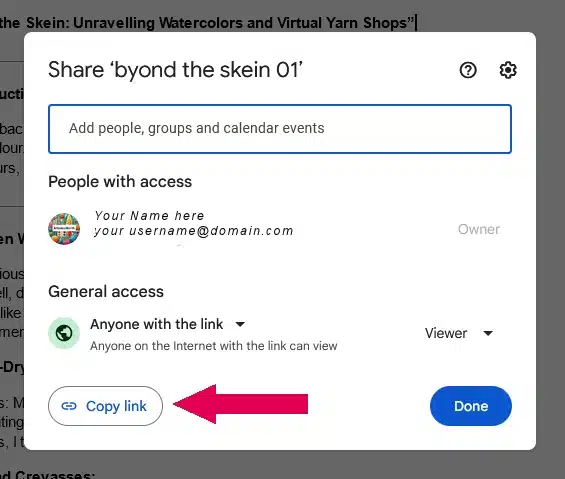
google docs author share 2

Return to the Virtual Knitgroup and click on "Docs" as indicated by the pink arrow. You can also share "Slides", "Sheets" and "Forms"
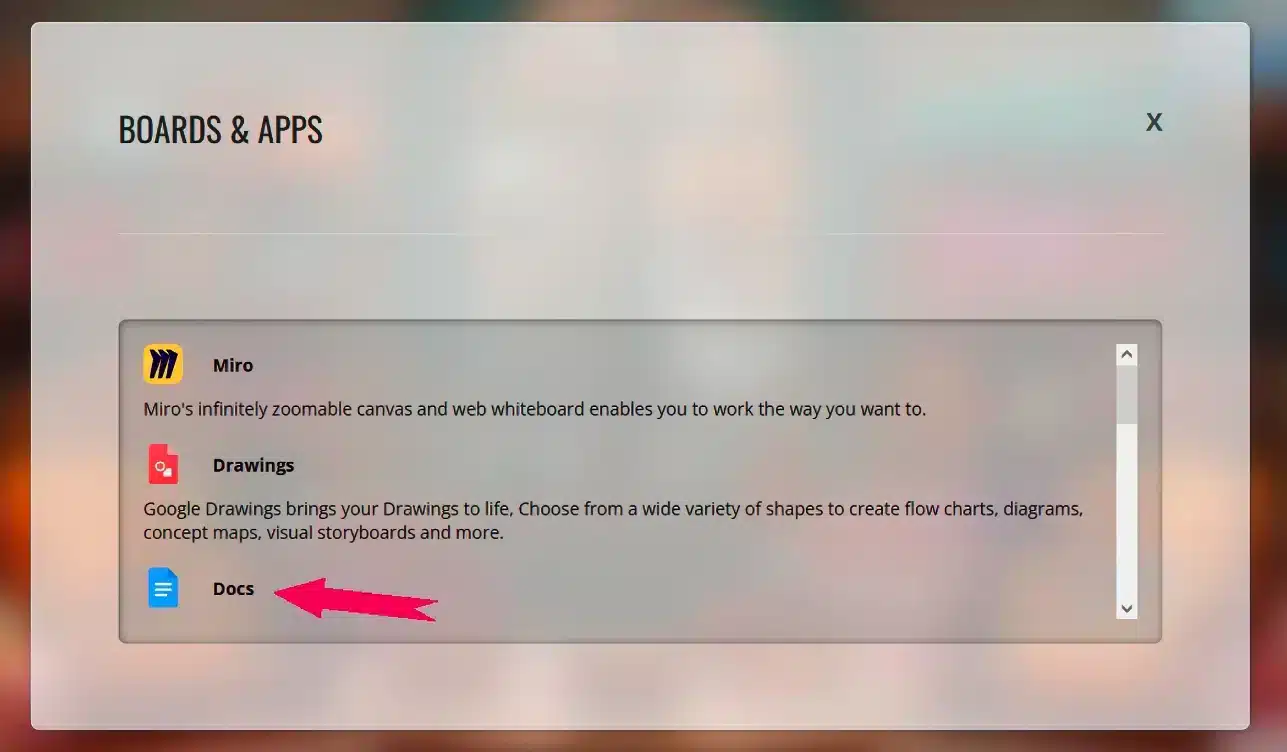
appls choice docs 1

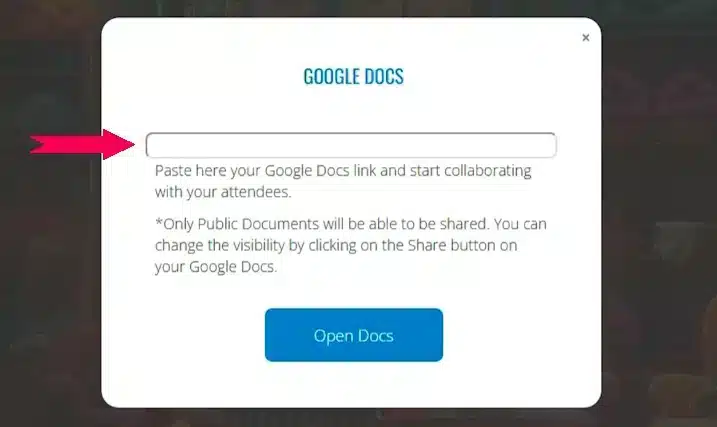
Next, insert your Google Doc link into the field marked by the pink arrow and click "Open Docs."
google docs share 2

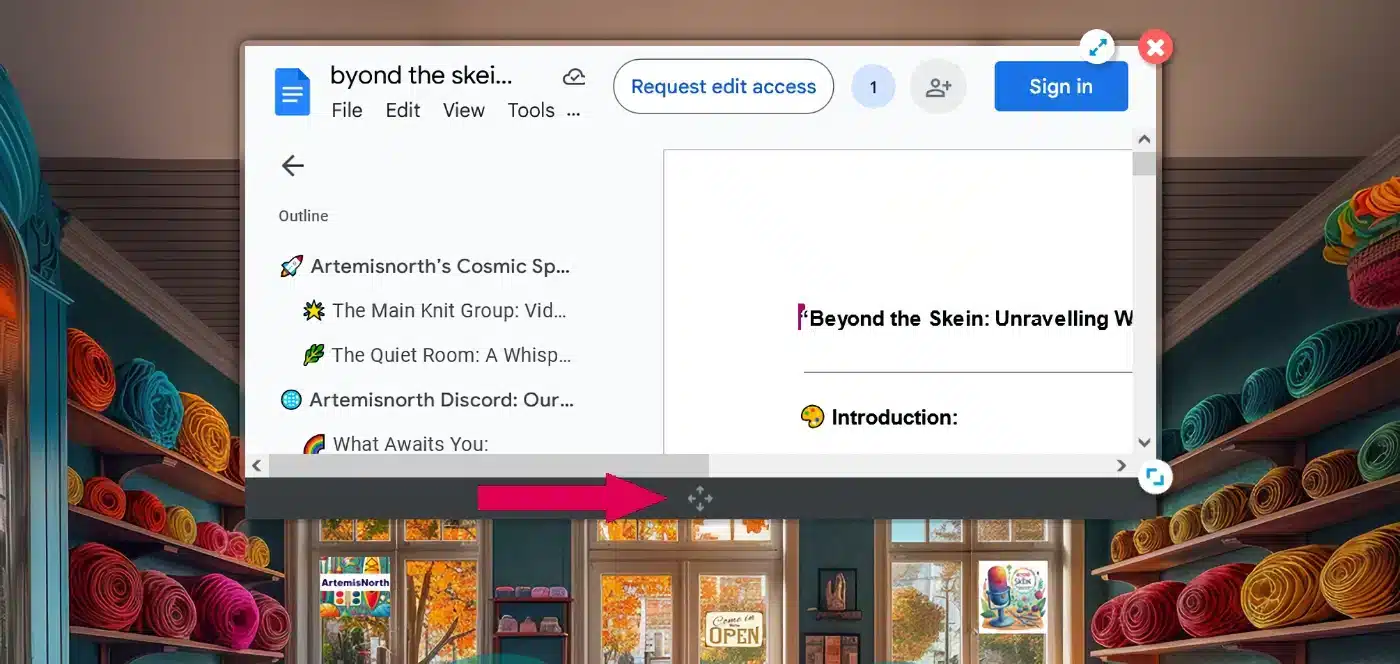
Pretty cool, isn't it? Now everyone can see your document. You can resize it by using the circle with two arrows located in the lower right of your window.

If you need to move the window around the screen, just drag and drop it using the four arrows indicated by the pink arrow on the dark grey bar at the bottom of the window.

google docs how to move

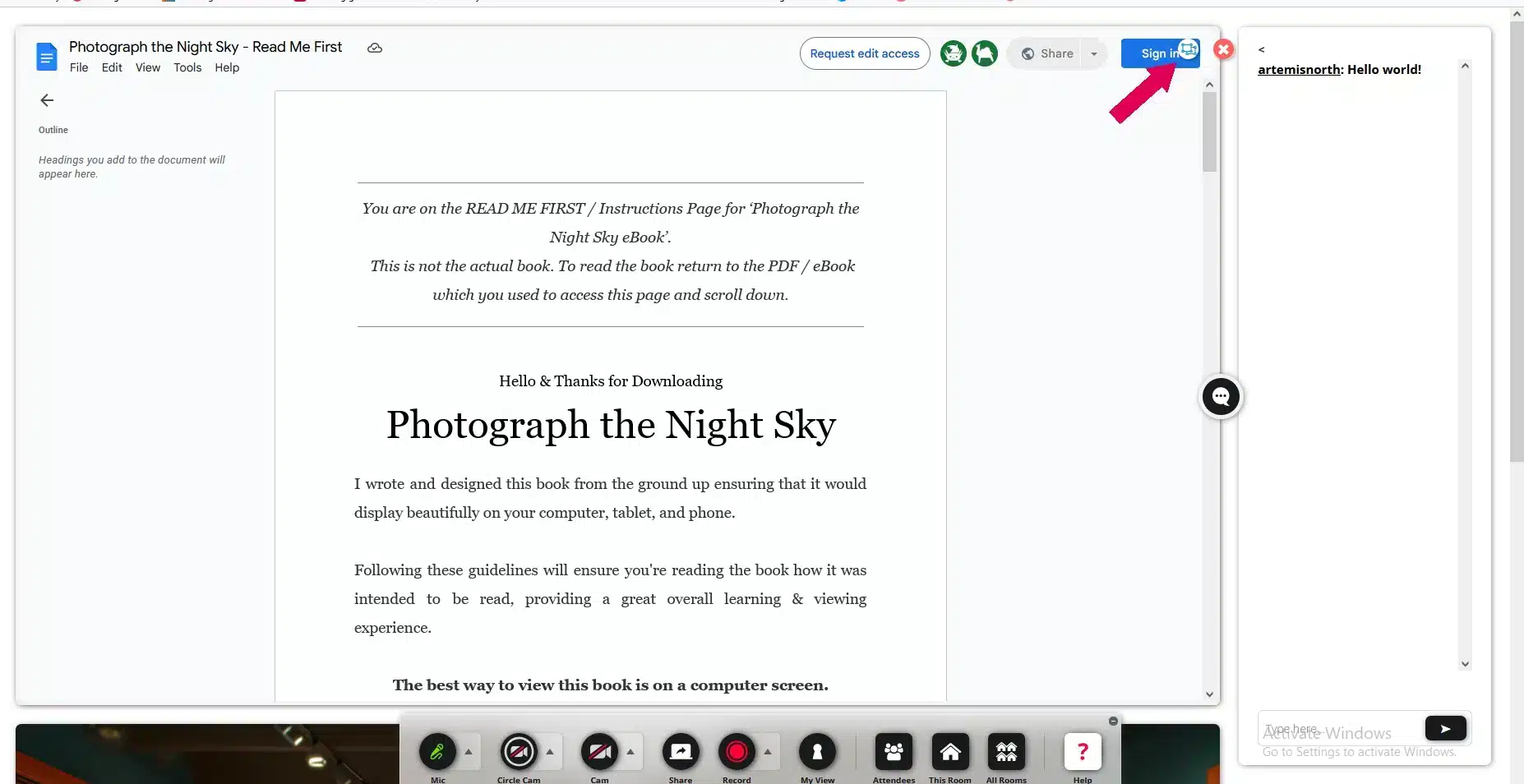
One of my favorite features when sharing documents is the ability to view them in full screen! Simply click on the double arrows marked by the pink arrow to expand the document.

google doc inframe full

Below is the view you'll get in full screen mode. The chat box appears on the right, and if you scroll down, you'll see the room beneath the document. It's a straightforward way to see everything clearly and follow along.

google docs full screen 1

To exit full screen mode, just click on the small circle with a box inside, marked by the pink arrow, and the view will revert back to the smaller screen within the room.

To stop sharing your google doc, click on the "Share" circle to turn it off.

- Back to Top -

Sharing Websites

The ability to share a fully interactive website offers numerous benefits. For instance, imagine shopping online with a fellow fiberartist, selecting materials for a project you're both working on. The potential uses for this feature are truly limitless!

To share your website, just click on the “Share” circle like before. When the menu appears, select “Boards & Apps” which is indicated by the pink arrow.

gdocs share

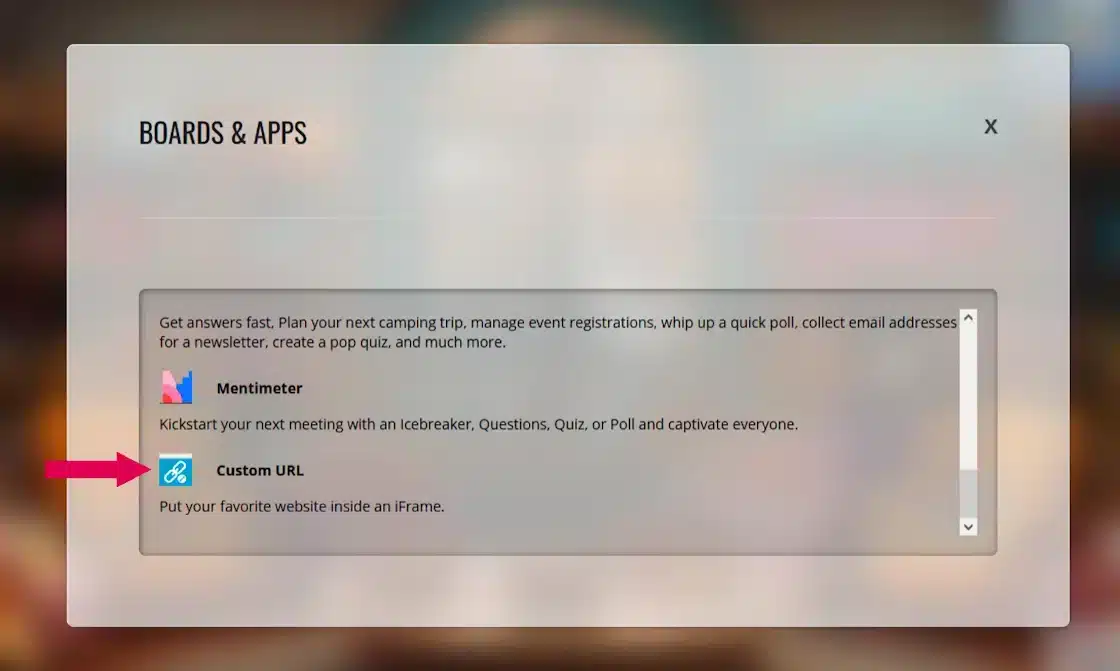
Next, scroll down a little and click on "Custom URL" as indicated by the pink arrow.
share fave website

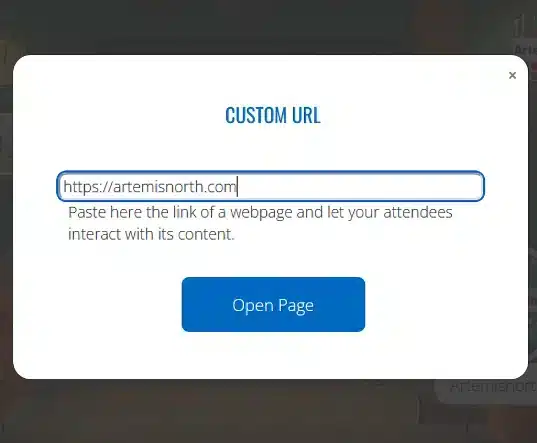
Paste or type the website URL into the box.
paste url

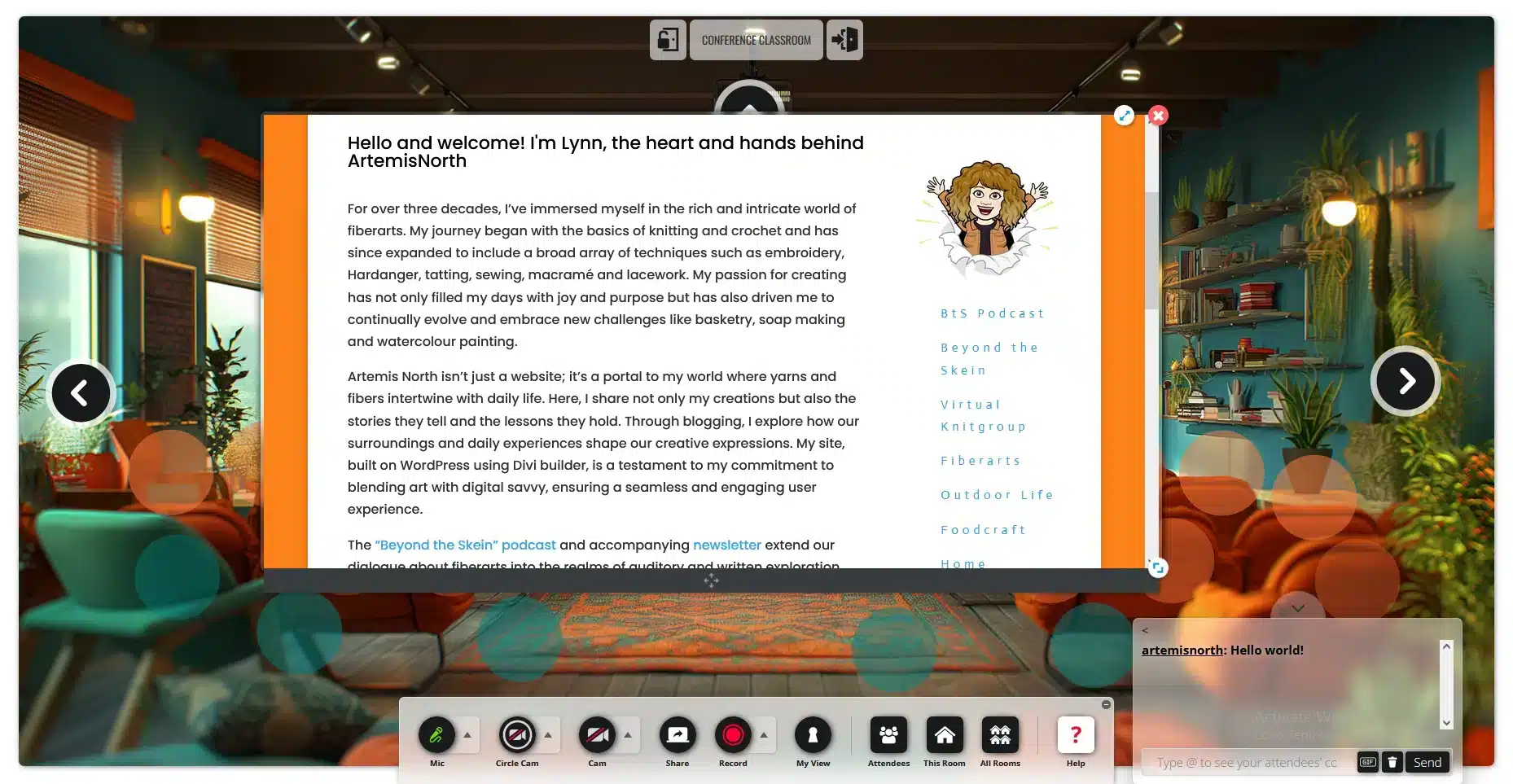
And there you are, sharing a fully interactive website. Have fun!
share website full

To stop sharing your website, click on the "Share" circle to turn it off or the little red "x" at the top right of the window.

- Back to Top -

Sharing Files

Deciding whether to allow file sharing required some thought. On one hand, we could create a shareable library; on the other, there were copyright concerns to consider.

Here's the plan: I've enabled file sharing in each room for now, but I ask that you adhere to a few simple guidelines:

  1. Please delete any files you've shared before exiting the room.
  2. Original work can be posted in the Main Knitgroup room to create a sharable library. If you are the original designer, or if you reference the pattern and include your own insights or modifications, please rename your file starting with "00-", such as "00-filename."
files first screen

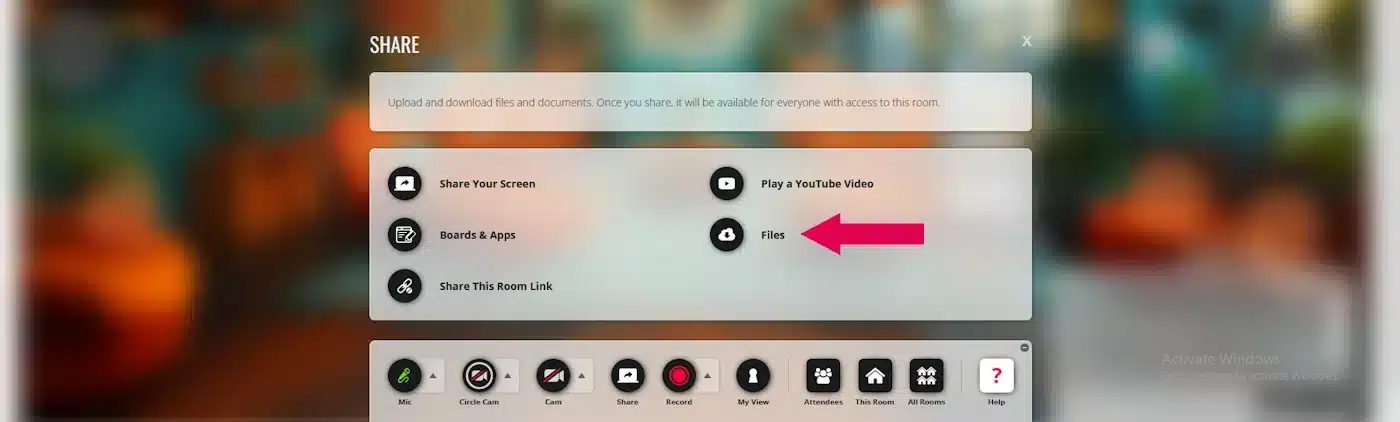
To share your files, just click on the “Share” circle like before. When the menu appears, select “Files,” which is shown by the pink arrow.
files 2nd image

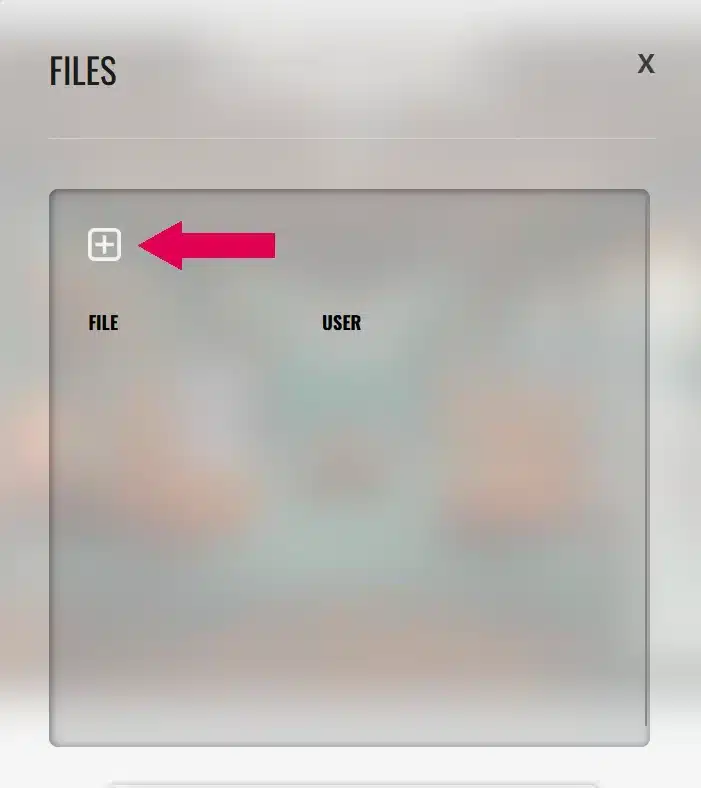
To add a file, click on the white box marked with an X, as shown by the pink arrow.
files 3rd image

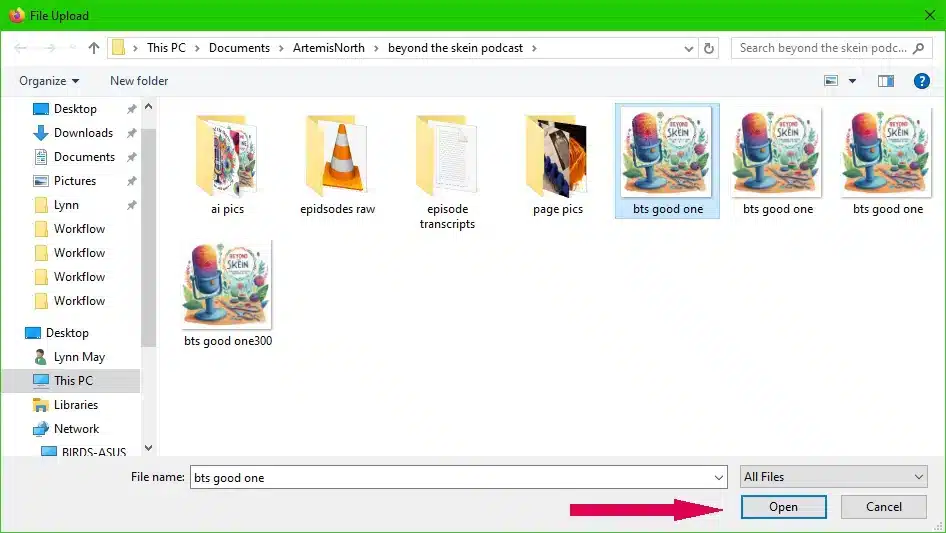
Choose which file you want to upload and click, "Open" as shown by the pink arrow.

files 4th image

To delete your files, simply click on the white box that contains an X as shown by the pink arrow.

files 5th image

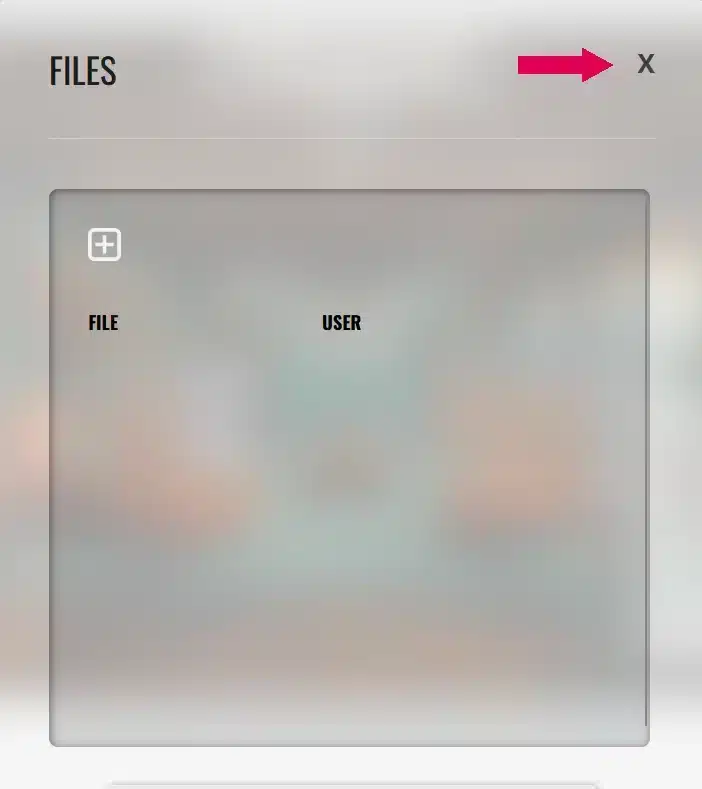
To close the file sharing window simply click the "X" at the top right of the window as shown by the pink arrow.

- Back to Top -

I think we are all going to have some fun!! 

Until next time friends...

welldone

Untangling tech for the creative brain.

I help neurodivergent makers and anyone dealing with tech-stack or workflow chaos clear digital clutter and build practical systems that actually work. 1:1 consulting and community co-working to help you get unstuck and finish what matters.

Let’s sit down 1:1 and build a workflow that actually works.
Drop into my Office anytime. If I’m online, I’ll greet you. If not, leave a note and I’ll get back to you.