When Politics Crash Knit Happens

Yesterday, near the end of Knit Happens Wednesday, just as I was wrapping up a lovely session of stitches and chatter, a conversation unfolded that rocked me to my core.

Out of nowhere, this intelligent, confident Latino woman timidly drops:

"I voted for Trump."

Not in passing. Not as a footnote. But as a social experiment.

Her goal? To see how we’d react. Because apparently, she had recently lost a close friend over this and was feeling some kind of way about whether she’d still be accepted in spaces she cared about.

Now, the golden rule of Knit Happens is NO Politics, NO Religion. This is sacred yarn space, where the biggest debates should be over things like "Is it called a granny square if it’s a hexagon?" or "Can you ever really have too much yarn?"

But... we were a small group. The clock was ticking down. And curiosity got the better of me. So, I let it play out.

Internal Reaction: 💥SYSTEM OVERLOAD💥
I won’t lie. My brain short-circuited for a second. The neurons started sparking like an acrylic sweater in a dry winter.

The initial, deeply visceral reaction went something like this:

"WHY?"
"As a woman… WHY?"
"As a Latino woman… WHYYYY?!"

If my thoughts had a sound effect, it would have been a record scratch followed by the Windows error chime.

But I said nothing. I took a deep breath. Let the wave of emotion pass. And instead of unloading my knee-jerk thoughts, I sat with them.

And you know what? That was the best thing I could have done.

Because instead of a debate, a conversation happened. Not about politics, not about policies, but about acceptance—about what it means to have space where you’re not automatically judged for one decision, even a major one.

And really… who am I to decide whether her vote was right or wrong? I’m Canadian. My country prides itself on compassion, on being a safe harbor in a storm. And yet, this still bothered me.

Like… why, though? Why did this moment dig into my brain like a stray stitch in the middle of a lace chart?

Midnight Musings:
I woke up in the middle of the night still mulling it over.

Was it because of the ongoing chaos to the south that has spilled into my own country? Was it the seeming contradiction of voting for someone whose policies don’t seem aligned with her personal reality?

Or was it something even deeper—this weird assumption that kindness is weakness? That being open-hearted, welcoming, and trying to do the right thing somehow makes us vulnerable?

Is it weak to do the right thing, even when no one is watching?
Is it weak to be compassionate, even when others sling mud at you?
Is it weak to be a friend to the world?

Or—plot twist—is that actually our greatest strength?

Because the funny thing about kindness? People mistake it for passivity. They don’t see it coming when the time comes to stand firm and fight for what truly matters.

Final Thought:
So, what did I learn?

That my first reaction doesn’t have to be my final reaction. That listening—not agreeing, but just listening—can be powerful. That empathy is a tool, not a trap.

And that at the end of the day, knitgroup is knitgroup. A place to weave together people, not just yarn.

So I’ll keep being me—stubbornly kind, fiercely thoughtful, and always up for a good discussion… as long as it’s about knitting. 😉

Until next time Friends...

Canada

Knit Happens… Even If It Starts with Just Me

Building a community is like trying to write the first few words of a post—you’re full of ideas but unsure where to start. So, I guess the beginning is as good a place as any...

Like many of you, I learned a big lesson during COVID: I took the small things for granted. Local, in-person knit groups—those vibrant gatherings filled with laughter, inspiration, and connection—were suddenly on pause. Online groups popped up, but they often consisted of the little cliques that had already formed locally. Don’t get me wrong; those groups were great for keeping in touch, but… they just weren’t the same.

There’s something truly magical about being surrounded by people who are your tribe. You know what I’m talking about—someone finishes a long-term project and holds it up for the group to see, glowing with pride. Everyone cheers because they’ve been following every stitch of that project’s progress. They’ve shared the excitement, the struggles, the triumphs.

I.Y.K.Y.K. (If You Know, You Know.) It’s hard to put that feeling into words—belonging, shared joy, and connection. So instead of trying to describe it, I built it.

I met someone who told me about this immersive community platform, he and his team created. At first, I was skeptical—too good to be true, I thought. After all, I’d just built a Fiberarts Community server on Discord. If you’ve used Discord, you know it’s a powerful tool (and it’s free), but it’s not exactly user-friendly, especially for something as warm and visual as a knitgroup.

But then came GoBrunch. I didn’t fall in love right away—it probably took three tries—but when it clicked, I was hooked. (Honestly, I’m thinking we’ll need a 12-step program for this soon.) Picture attending a virtual knitgroup where you see the space, interact with people visually, and actually feel like you’re there. It’s not just text on a screen—it’s a full experience.

That’s when the Fiberarts Community was born, and let me tell you, it’s unlike anything else—online or off. I know because I’ve looked.

The community space is open 24/7 and completely free. No emails, no passwords—just pick a name, an avatar, and come on in. When you “walk through the front door,” you’ll find a main community space with a directory and a bulletin board to keep you updated on what’s happening. From there, it’s all yours to explore.

Gather with friends. Meet new ones. Each room offers something unique, with tools like circle cams, presentation screens, and (my favorite) Artybot—your fiber arts assistant. It’s a space designed for creativity, connection, and collaboration.

But here’s the thing about community: you have to start somewhere. I feel a bit like Kevin Costner in Field of Dreams—“If you build it, they will come.” Except it’s not quite that easy.

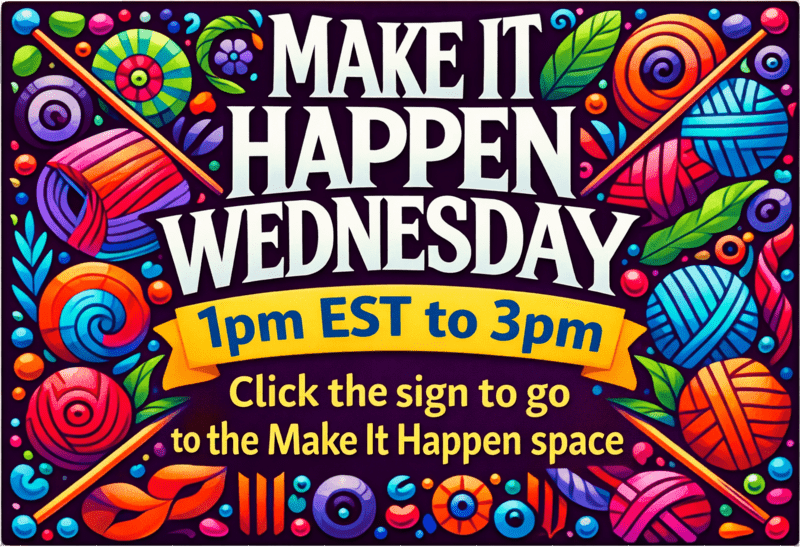
So I’ve set a date. Starting January 8th, 2025, the Fiberarts Community will host “Knit Happens Wednesdays” every week from 1 PM to 3 PM EST.

I have a friend who started her own initiative—something she truly believed in. She picked a time and just… showed up. Week after week, she sat there alone until, one day, people started joining her. Slowly but surely, her passion built something that added real value to people’s lives.

That’s what I want for Knit Happens Wednesdays. I’ll be there every week—showing up, waiting, ready to welcome you. And don’t think I’ll let you forget about it! I’ll be reminding you in emails, the newsletter, the podcast, and on social media because I believe in this space and its bright future.

Community takes time to grow, but I know it’s worth the wait. I hope you’ll come, pull up a chair, and be part of it.

Let’s make Knit Happens Wednesdays something special—together.

Until next time friends...
D.I.Y.

Handmade Happiness: The Power of Crochet Kindness

Random Acts of Crochet Kindness: Spreading Joy Across Canada

In a world where kindness can sometimes feel in short supply, the Facebook group "Random Acts of Crochet Kindness Canada" is a breath of fresh air. This vibrant community of crocheters is dedicated to spreading joy one stitch at a time, and their impact is felt from coast to coast.

A Community of Kindness

The group consists of people from all walks of life, united by their love of crochet and their desire to make a difference. From local members in my hometown to participants across Canada, the spirit of generosity and creativity is infectious. These talented individuals create small, delightful crochet items and leave them in public places for others to find, brightening the days of countless strangers

The Magic of Handmade Gifts

What makes these random acts of crochet kindness so special is the personal touch. Each item is handmade with care, embodying the time, effort, and love of its creator. Whether it's a cute amigurumi character, a colorful flower, or a cozy little heart, each piece carries a message of warmth and positivity.

Finding Joy in Unexpected Places

Imagine walking through a park, having a rough day, and suddenly spotting a cheerful crochet creation with a note that says, "Take me home, I'm here to brighten your day!" These small tokens of kindness can turn someone's day around, reminding them that there's still good in the world. It's a simple yet powerful gesture that resonates deeply with those who find them.

Sharing Patterns and Support

One of the wonderful aspects of "Random Acts of Crochet Kindness Canada" is the camaraderie among its members. The group shares cute little patterns with each other, ensuring that everyone has access to a variety of delightful designs to craft. Whether you’re a seasoned crocheter or a beginner, there’s something for everyone. The shared patterns range from adorable animals and whimsical characters to lovely flowers and hearts, providing endless inspiration for acts of kindness.

But the group is more than just a repository of patterns. Members offer advice and support to each other, creating a nurturing environment where everyone can improve their skills and feel part of a community. Whether someone needs help with a tricky stitch or wants feedback on a new design, the group is always ready to lend a hand. This spirit of cooperation and encouragement strengthens the bonds between members and makes the act of giving even more meaningful.

QR Codes and Labels: Spreading the Message

To make the act of giving even more special, the group has created QR codes and labels that members can attach to their crochet items. These labels often read, "Take me home, I'm here to brighten your day!" and include a QR code that links to the group’s Facebook page. This allows the recipients of these random acts of kindness to learn more about the initiative and perhaps even join in the fun. It's a clever way to spread the word and grow the community, ensuring that more people can experience and contribute to the joy of crochet kindness.

Join the Movement

If you’re a crocheter looking for a way to give back, or if you're simply someone who appreciates the beauty of handmade crafts, consider joining "Random Acts of Crochet Kindness Canada" on Facebook. The group is welcoming and supportive, providing a platform for sharing creations, ideas, and stories of kindness. Whether you’re looking to share your own patterns, seek advice, or simply spread some joy, you’ll find a like-minded community ready to embrace you.

Final Thoughts

In these challenging times, it's heartwarming to see how a simple crochet hook and some yarn can create ripples of joy. "Random Acts of Crochet Kindness Canada" is proof that kindness doesn't have to be grand or costly; it can be as simple as a small crocheted gift left for someone to find. So, let’s celebrate these wonderful crafters and the happiness they spread, one stitch at a time.

By participating in this group, you not only get to indulge in a creative hobby but also become part of a nationwide movement that touches lives in the most delightful ways. Join "Random Acts of Crochet Kindness Canada" today, and start spreading some handmade joy!

Until next time friends...
I appreciate you

Is Your Everyday Life Interfering with Your Art?

I almost fell in.....

Some days, it’s tough to start anything, even just writing the first sentence. I know what I want to say, but getting it out is a struggle. You know those days.

For the past six months, I've been working to build an online Fiberarts Community with all the bells and whistles. It's been fun learning new things and designing online experiences, but I've been neglecting the real world. It's been over a month since I've picked up my paint brushes and several weeks since I've spent more than half an hour knitting. My real-life art has been overtaken by the digital life I'm building. I now see this is a classic example of not balancing life and work.

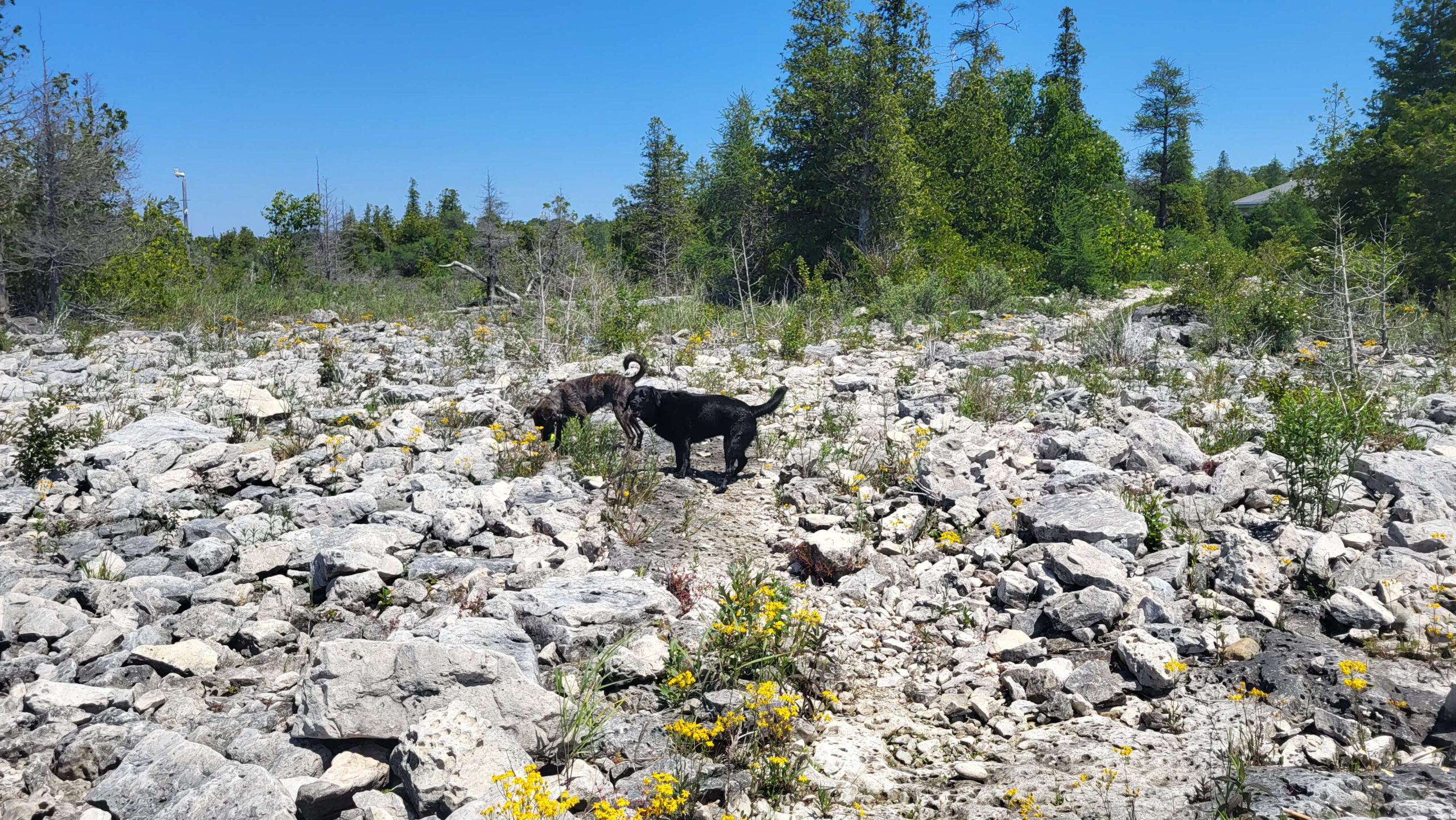
I recently spent 8 days at my MIL's and thought I had everything set up to work, but of course, there were tech glitches. I managed to get some work done, but it had been so long since I spent an afternoon knitting, and Lake Huron was just meters away. So, I decided to take a break. Between tech issues, spotty internet, two dogs, a lake, and my knitting, it was an easy choice.

20240624 135704 scaled

20240624 135711 scaled

Committing to Change!

I was actually there to help my MIL after a heart scare (she's doing well now). I just helped with things around the house and cooked meals, nothing more than I do at home. It was nice to spend time with her. In the afternoons, I’d sit and knit, which was glorious! I had planned to go to the lake every day, but various mattresses took a toll on my back. I still enjoyed the view and took a few nice trips to let the dogs play in the water.

As a person with A.D.D., I need to find a way to schedule my time so that all aspects of my life are in balance. Here are some techniques that might help:

  1. Time Blocking: Allocate specific blocks of time for different activities, such as work, art, and relaxation. Stick to these blocks to ensure you give attention to all areas of your life.
  2. Prioritizing Tasks: List your tasks in order of importance and tackle them one by one. This can help prevent feeling overwhelmed and ensure that you make progress on your most important projects.
  3. Setting Alarms and Reminders: Use alarms and reminders to keep you on track throughout the day. This can help manage transitions between activities and ensure you don’t lose track of time.
  4. Breaks and Downtime: Schedule regular breaks to rest and recharge. Short, frequent breaks can improve focus and productivity.
  5. Combining Activities: Find ways to combine activities you enjoy with those you need to do. For example, listen to a podcast while knitting or take a walk while brainstorming ideas.

This experience has given me some insight into the importance of balancing life and work. It's easy to get caught up in projects and let them consume all our time, but it's crucial to step back and reconnect with the real world. Taking breaks, enjoying hobbies, and spending time with loved ones are essential for our well-being and creativity. Moving forward, I’m committed to finding a better balance and making time for the things that bring joy and relaxation into my life.

Until next time friends...
sun basking

Unraveling the Mystery: Simplifying the Butterfly Shawl Pattern

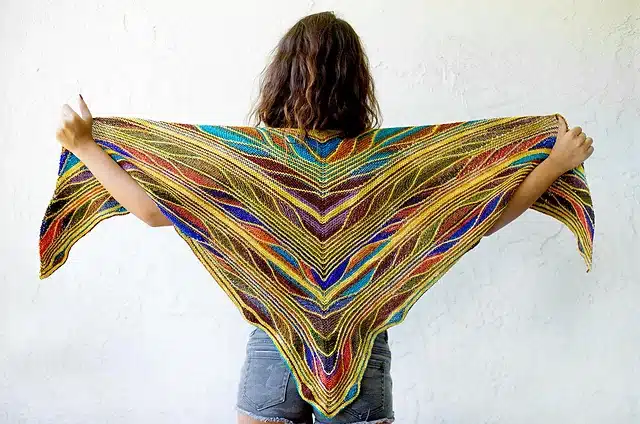
A couple of years ago, I stumbled upon the "Butterfly Shawl" pattern in MarinJa's Ravelry Store and was instantly captivated by its beauty. Yet, I quickly discovered that, while the knitting itself isn't overly difficult, keeping track of where you are in the pattern can be quite the challenge. The design consists of three color-coded modules that repeat in various sections, demanding a good deal of attention to detail.

urth 6 medium2
urth 1 medium2

I found it worth the effort to devise a method to keep track effectively. Many knitters have shared their hacks online, but I particularly enjoyed the guidance from The Yarn Queen NZ’s YouTube video—it was a real game-changer for me.

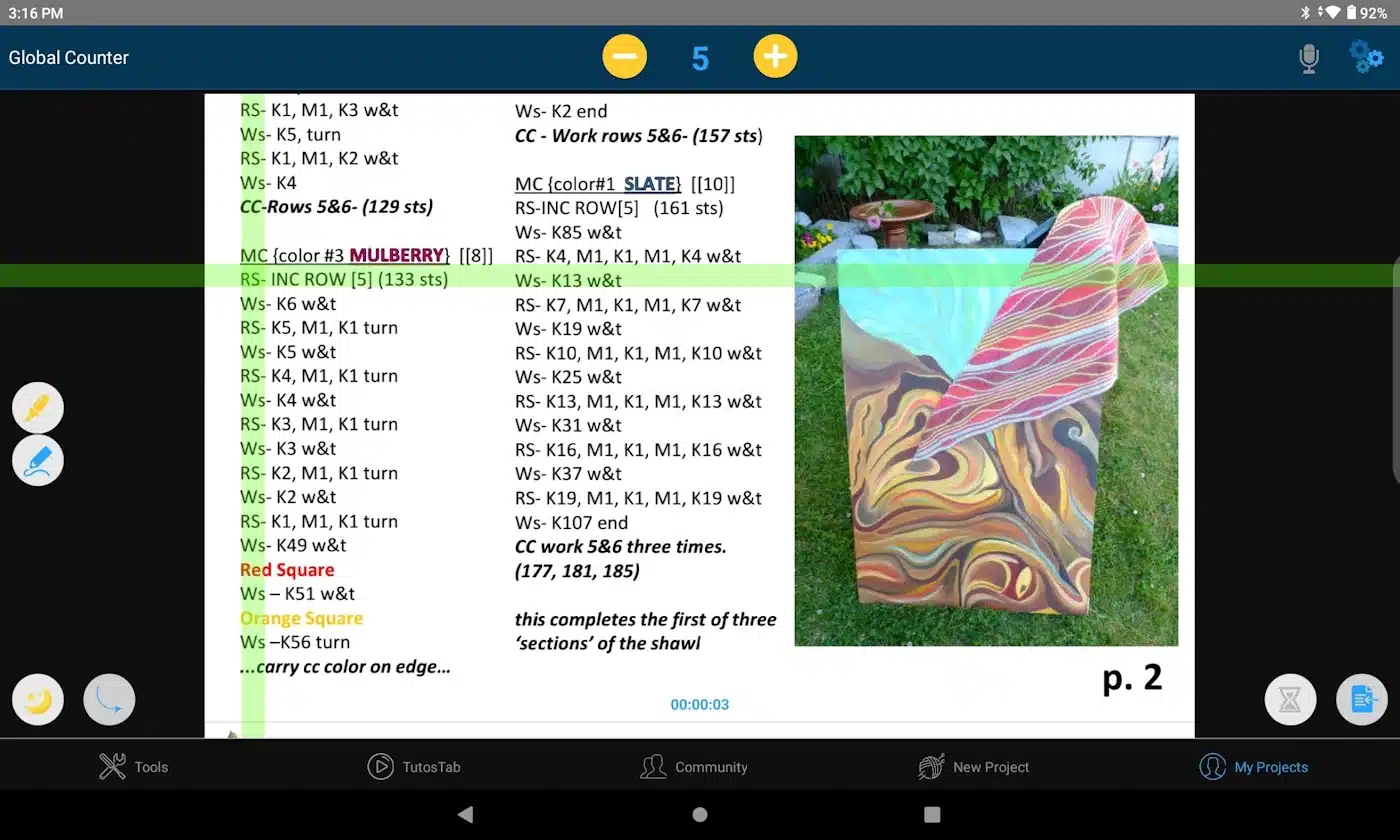
To help manage the colorful sections, I turned to the Knitting Genius app on both my tablet and phone. It's packed with helpful tools and well worth the annual subscription.

butterfly shawl tablet
butterfly shawl phone

As someone with a neuro-divergent mind, I can hyper-focus on a project but often struggle to remember where I left off if I step away for a while. This was one reason I hesitated to start this project, especially since working with short rows can be confusing and, if done incorrectly, can result in gaps.

My breakthrough came when I received a gift card for a local yarn shop, London Yarns. There, I met Judy, who had just finished her own version of the shawl. It was gorgeous, adorned with purples and pinks and a stunning edging in a crochet stitch known as the crab stitch, which she executed in the main colour. Inspired by her use of German Short Rows—an easier alternative to the traditional method—I decided to give them a try after watching a helpful tutorial by The Blue Mouse Knits.

With a solid plan in place, I began my shawl, although I frogged it several times until I settled on a colour combination that resonated with me. Now, several sections in, I find the process of knitting this shawl addictive. Each section's texture is more captivating than the last, and it's the first time I’ve worked with the garter stitch and thought, "Wow, that's beautiful!"

I have a lot on my plate, so I'm not sure how long it will take to complete the shawl, but I do know that each time I pick it up, it fills me with joy. What more could a fiberartist want?

Until next time friends...

beautiful

Learning to Use Sharing Tools in the Fiberarts Community

Learn how to share:

Let's dive into using those cool tools I mentioned! By the end of this post, you'll be able to Use the Circle Cam and the Presenter Cam. You'll be sharing your screen, Google Docs,and files like a pro with your fellow Fiberartists.

How to Use Your Camera

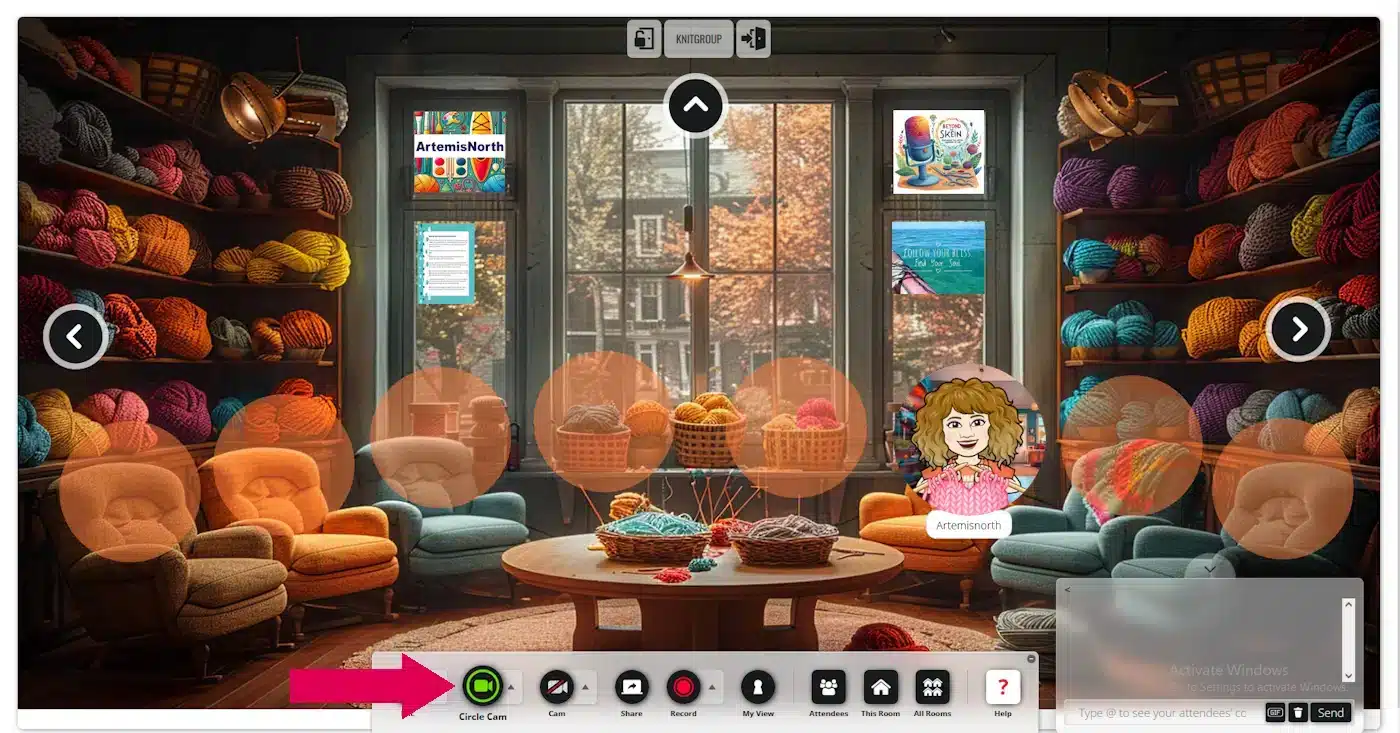
Using the Circle Cam is a breeze! When you first entered the space, you were likely prompted to use your camera. While not everyone chooses to activate it, if you want to use it, simply click on the "Circle Cam" button located in the toolbar at the bottom of the screen.

If you'd like to turn off your circle cam just click on the button again. Easy peasy.

camera circle

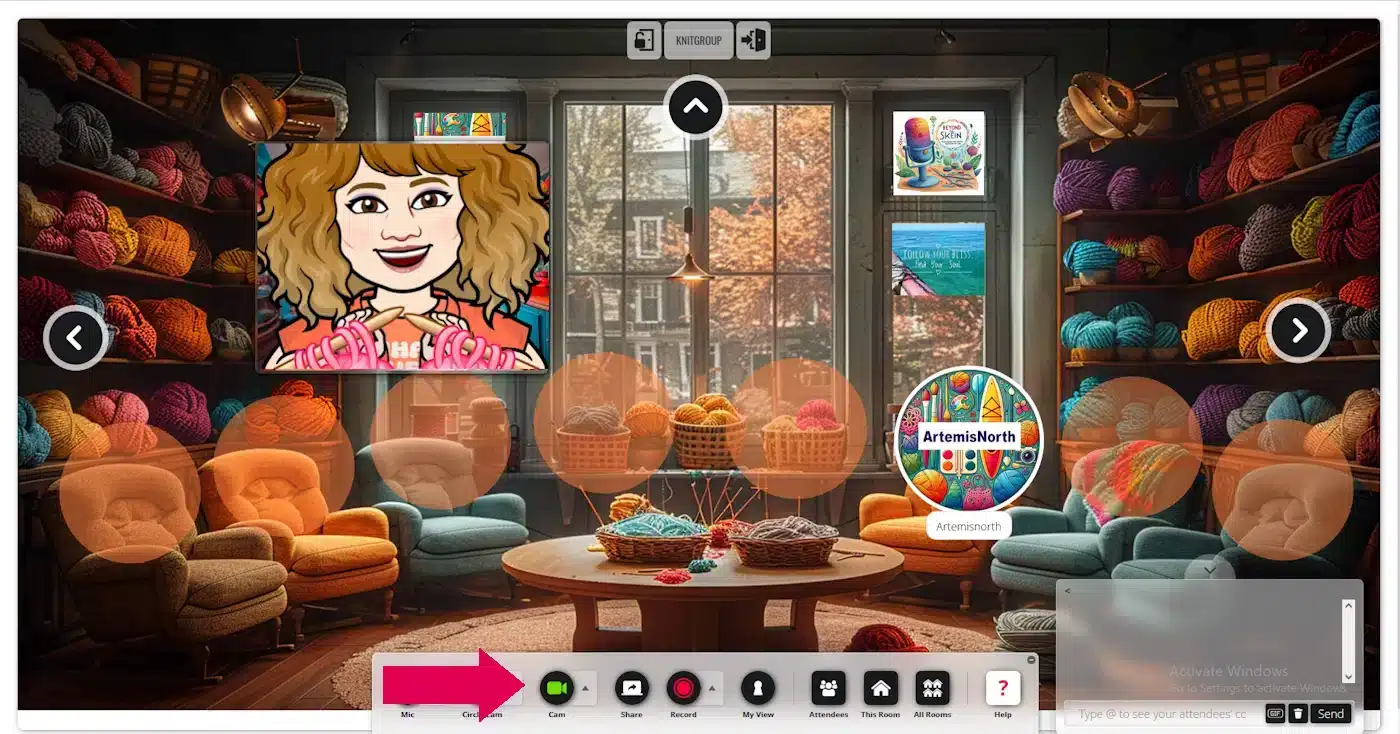
I'm really excited about the "Presentation Cam"! It's such a useful tool. Recently, a friend and I used it in the Whisperspace to work out a new stitch together. It was fantastic—I could see her work and she could see mine, which helped us figure it out in no time! I think you'll find this feature incredibly handy.


To use the Presentation Cam, simply click on the circle labelled "Cam." Once it opens, you can resize it by dragging a corner. To move the cam window, place your cursor in the centre until the four-arrow icon appears, then drag the window to your desired location on the screen.

camera presenter

To deactivate the presenter cam, simply click on the "Cam" button once more.

- Back to Top -

Screen Sharing

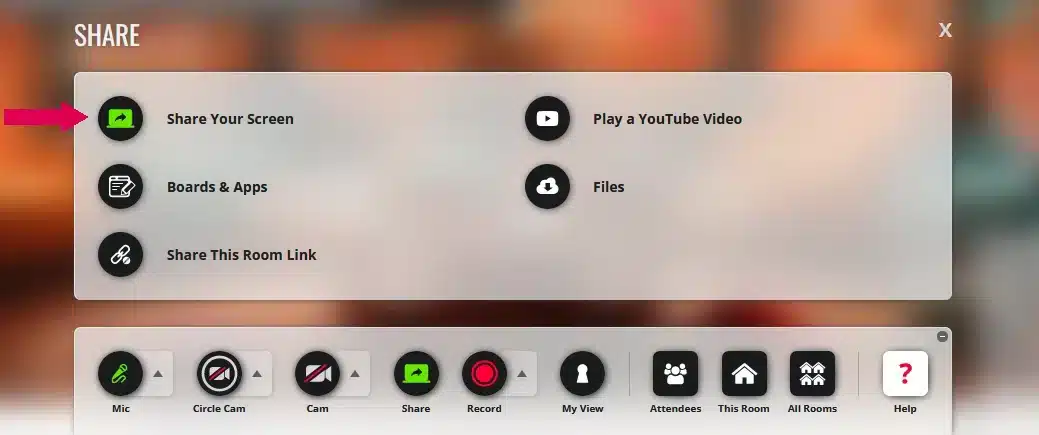
Sharing your screen allows you to collaborate directly on the same pattern, demonstrate chart-making, show how to use an app, or share anything else you want your friends to see. Simply click on the circle that says "SHARE" to the right of your Cam. Then click on "Share Your Screen".

screen share off

Please be aware: Your toolbar will have fewer items than mine, as I am the administrator. 

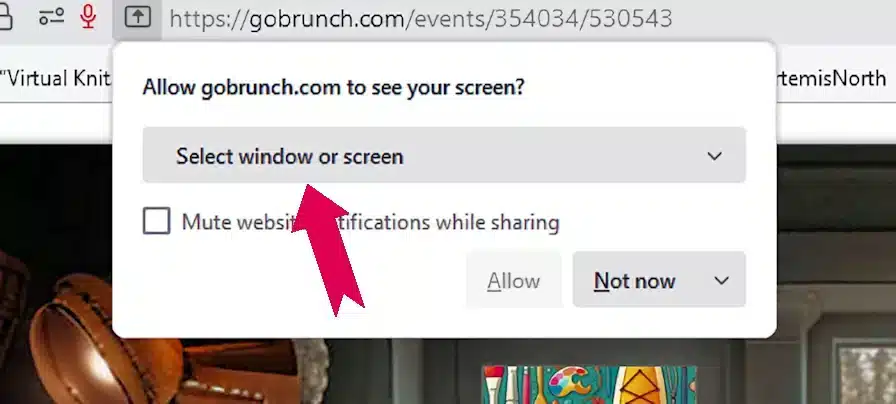
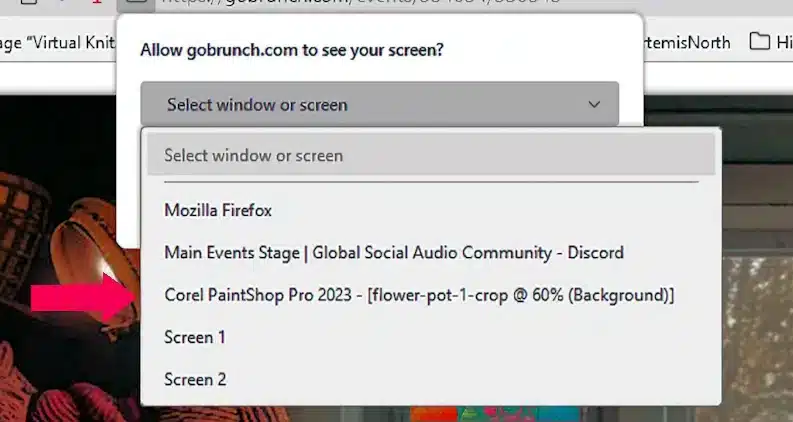
Next, click on "Select window or screen." A drop-down menu will appear, showing all the screens or apps available to you. For example, if you want to share a picture you're working on in PaintShop Pro, just click on that option.

allow screen
select screen

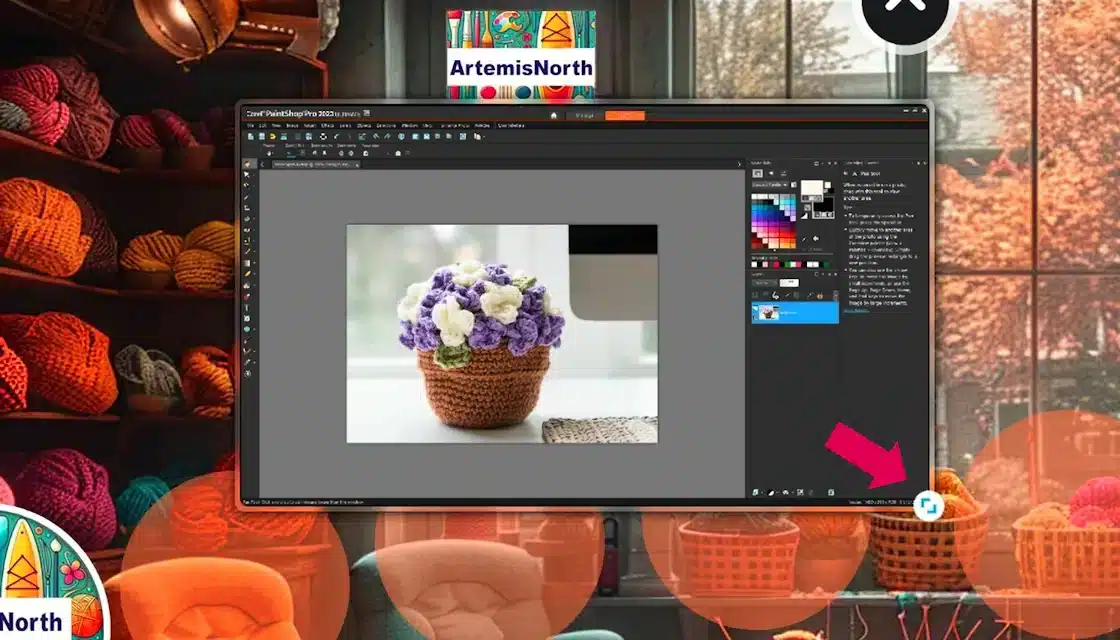
Voila! You're now sharing your screen. To resize the window, just click and drag the double arrow, indicated by the pink arrow, to your preferred size. If you need to move the window, simply click on it and drag it to your desired location.

screen shared

To stop sharing your screen, click the “Share” circle once more, and it will deactivate.

- Back to Top -

Sharing Google docs

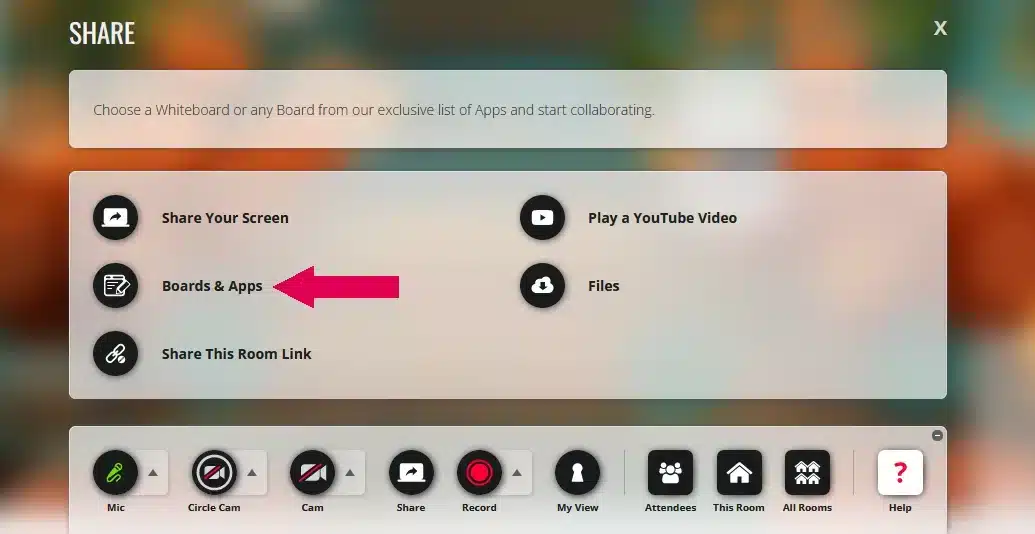
To share your Google documents, just click on the "Share" circle like before. When the menu appears, select "Boards and Apps," which is indicated by the pink arrow.

gdocs share

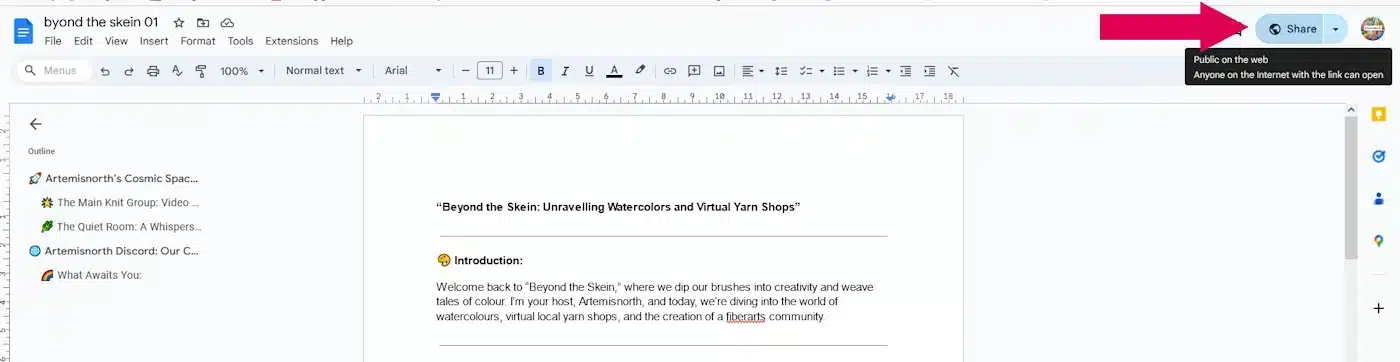
Please remember: before you can share Google Docs, spreadsheets, and other files, they need to be set to public sharing. Log into your google docs account, click on the document you want to share. You can adjust the visibility settings by clicking on the "Share" button in your Google Docs as shown by the pink arrow.

google doc indocs

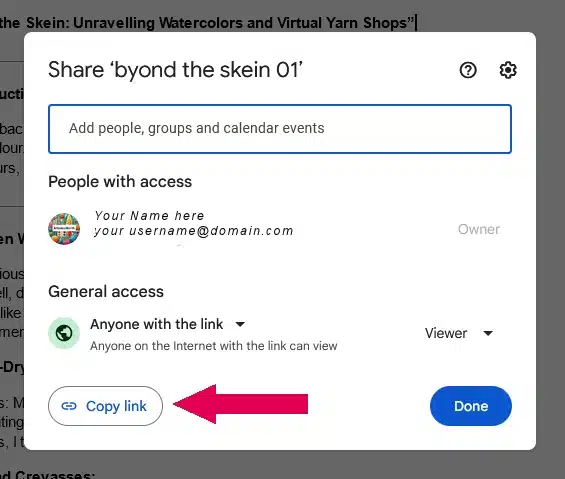
A small window will pop up. Below your name and email address you will see the "General" heading with a drop down menu below. Click on the menu and choose "Anyone with the link". You've just set your document to pubic but only people with the link can see it. (This can easily be reversed by logging into google docs and using the "Share" button.

Simply click on the "Copy Link" button and then the blue "Close" button to exit this window.

google docs author share 2

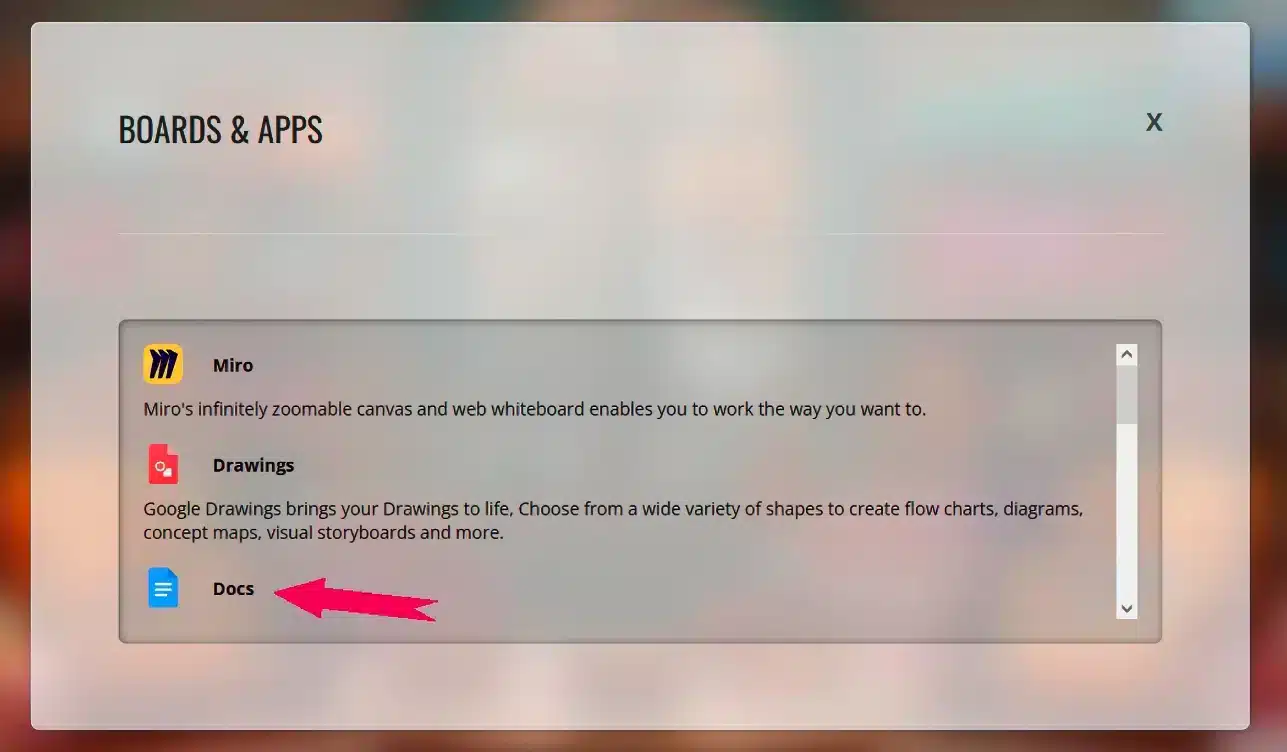
Return to the Virtual Knitgroup and click on "Docs" as indicated by the pink arrow. You can also share "Slides", "Sheets" and "Forms"

appls choice docs 1

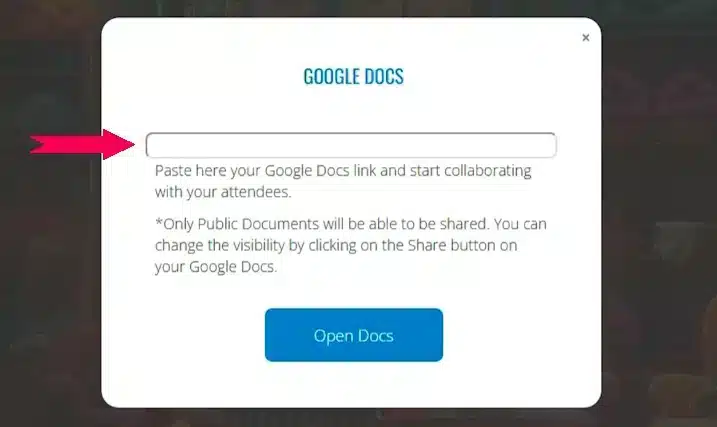
Next, insert your Google Doc link into the field marked by the pink arrow and click "Open Docs."

google docs share 2

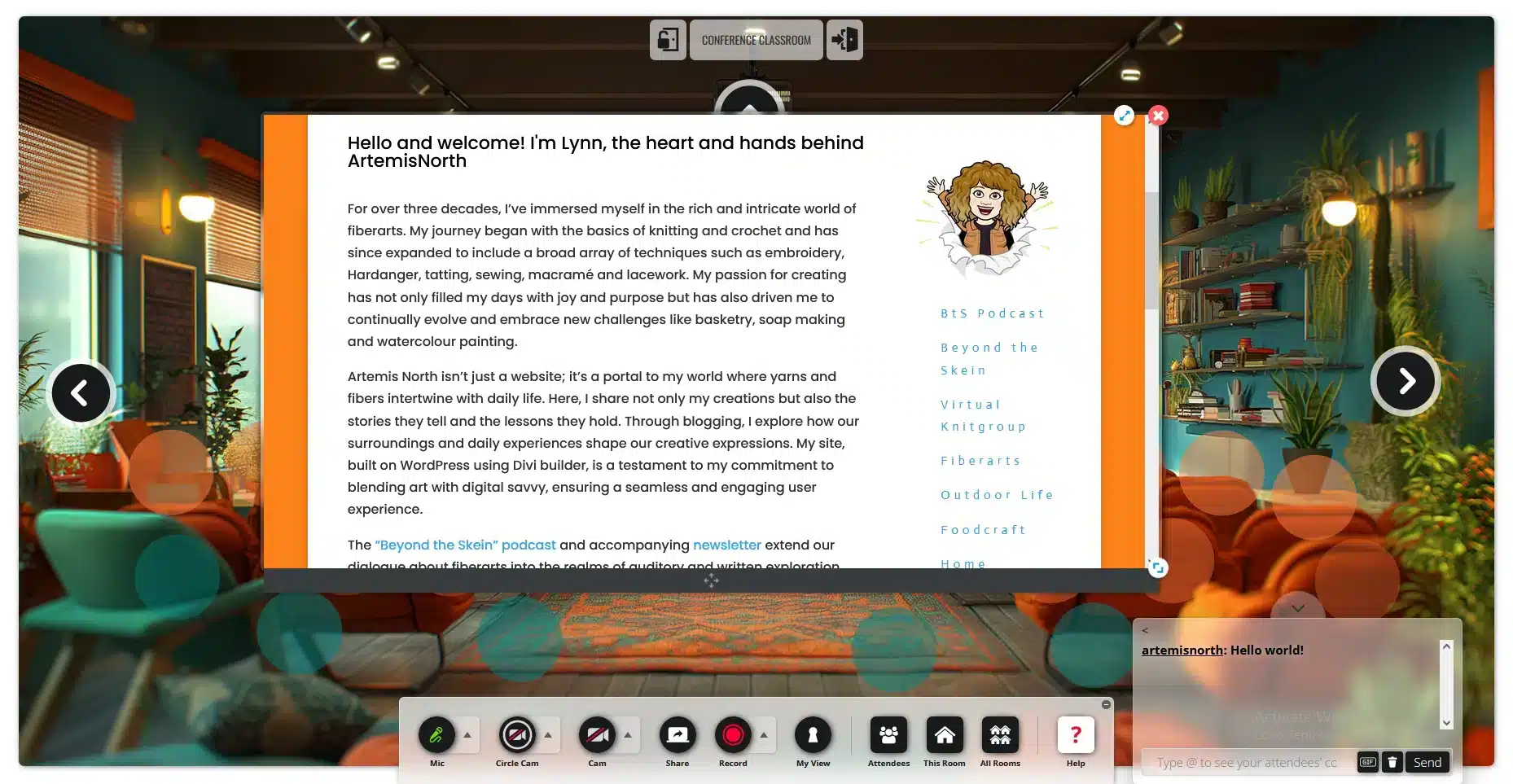
Pretty cool, isn't it? Now everyone can see your document. You can resize it by using the circle with two arrows located in the lower right of your window.

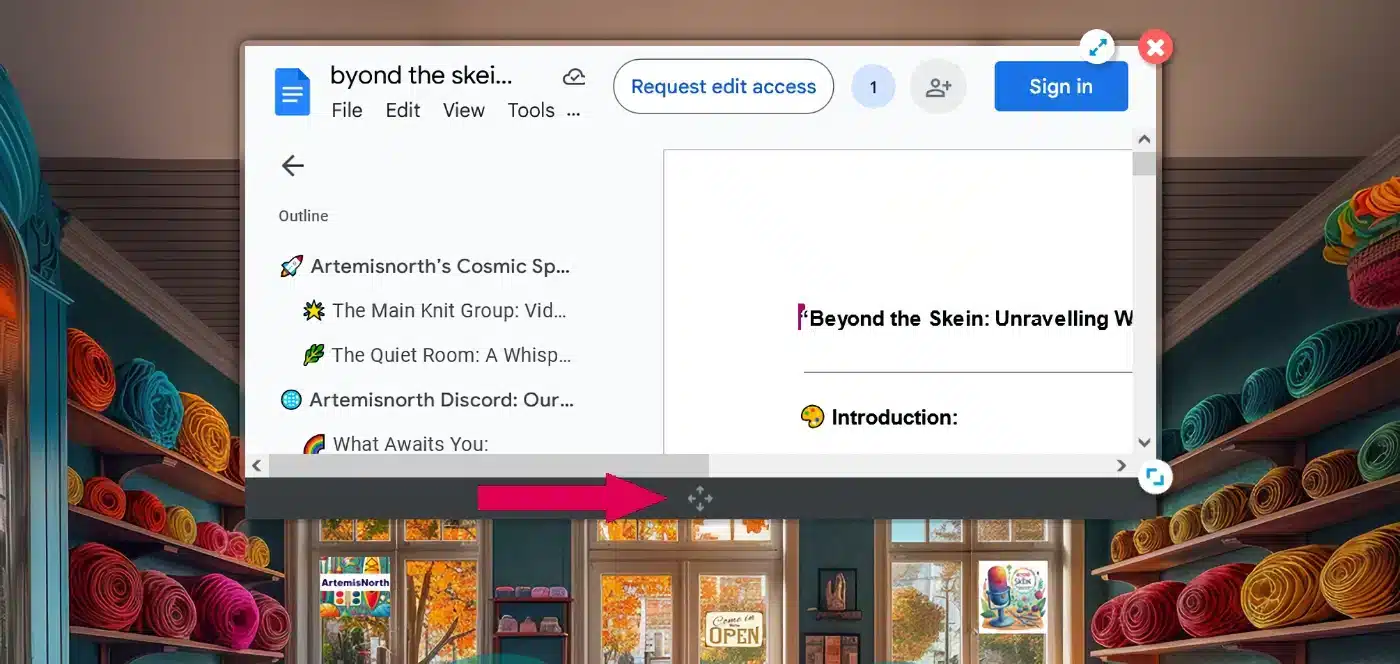
If you need to move the window around the screen, just drag and drop it using the four arrows indicated by the pink arrow on the dark grey bar at the bottom of the window.

google docs how to move

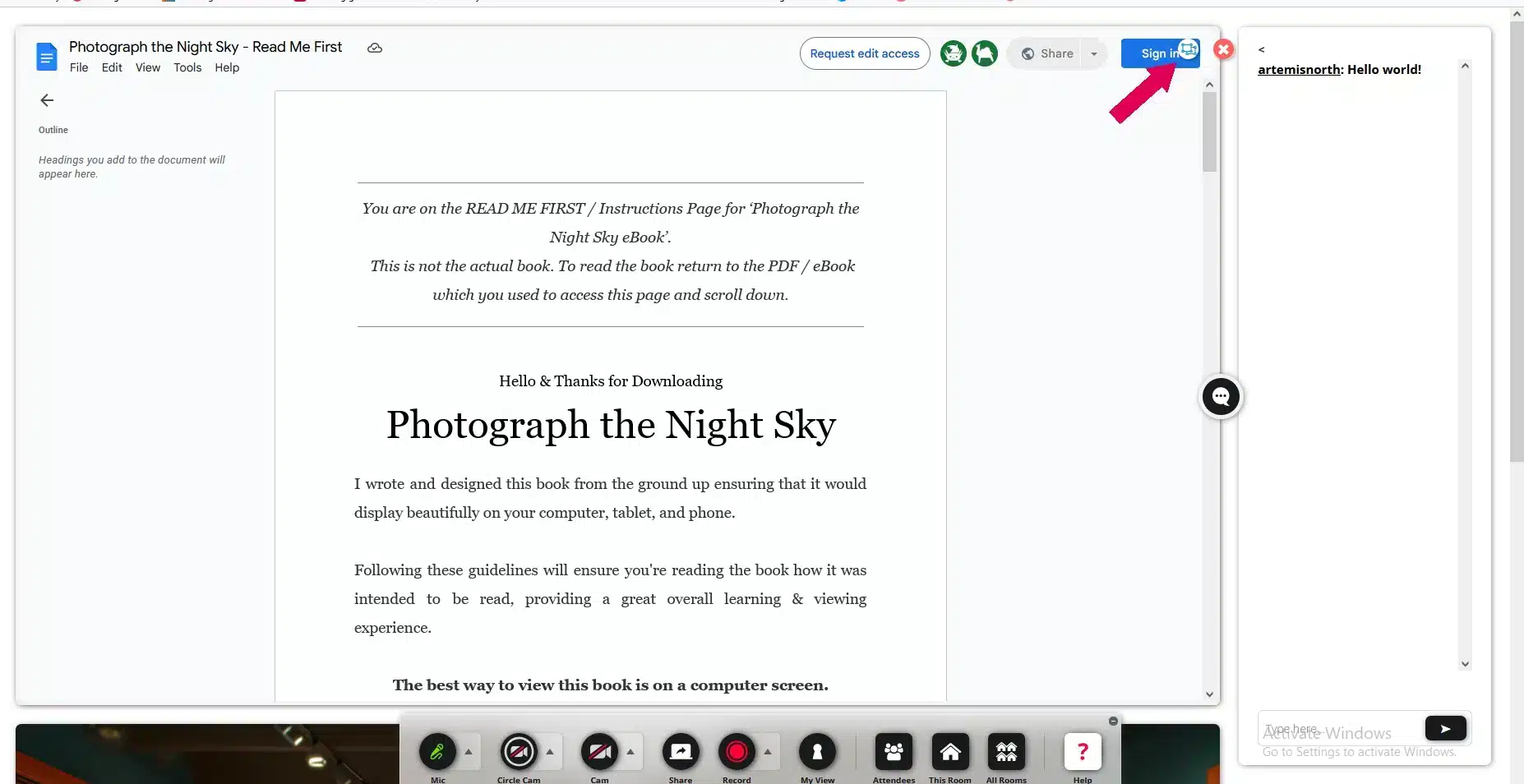
One of my favorite features when sharing documents is the ability to view them in full screen! Simply click on the double arrows marked by the pink arrow to expand the document.

google doc inframe full

Below is the view you'll get in full screen mode. The chat box appears on the right, and if you scroll down, you'll see the room beneath the document. It's a straightforward way to see everything clearly and follow along.

google docs full screen 1

To exit full screen mode, just click on the small circle with a box inside, marked by the pink arrow, and the view will revert back to the smaller screen within the room.

To stop sharing your google doc, click on the "Share" circle to turn it off.

- Back to Top -

Sharing Websites

The ability to share a fully interactive website offers numerous benefits. For instance, imagine shopping online with a fellow fiberartist, selecting materials for a project you're both working on. The potential uses for this feature are truly limitless!

To share your website, just click on the “Share” circle like before. When the menu appears, select “Boards & Apps” which is indicated by the pink arrow.

gdocs share

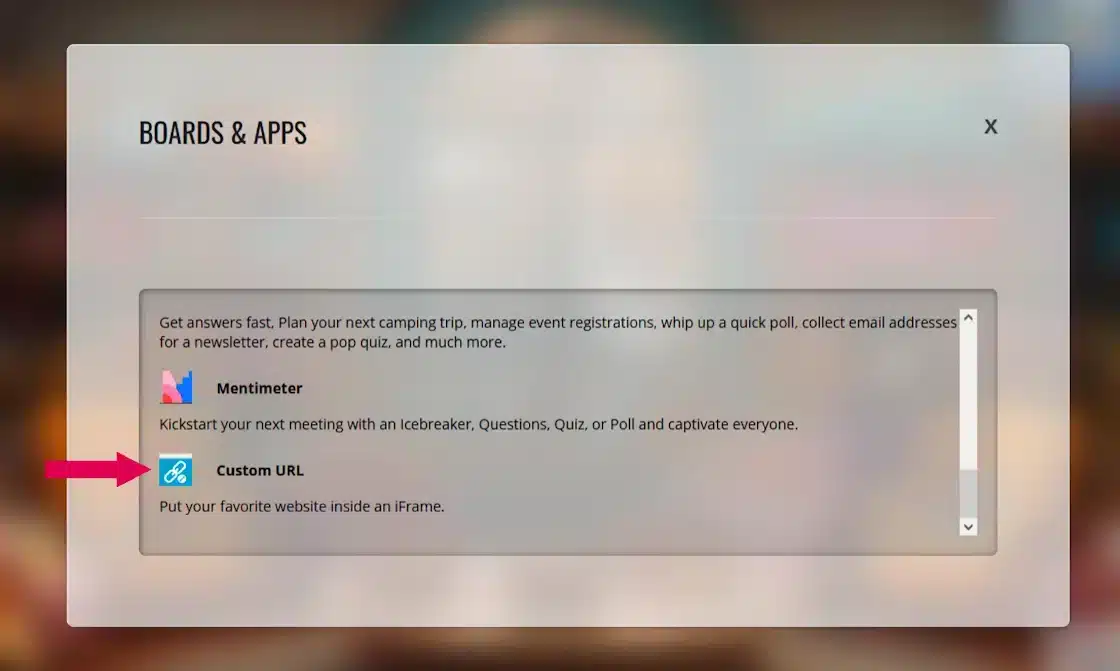
Next, scroll down a little and click on "Custom URL" as indicated by the pink arrow.

share fave website

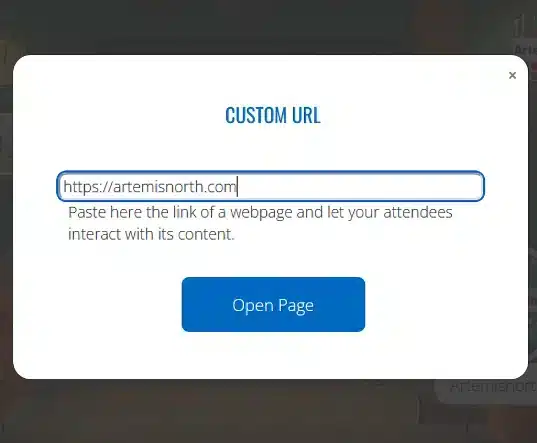
Paste or type the website URL into the box.

paste url

And there you are, sharing a fully interactive website. Have fun!

share website full

To stop sharing your website, click on the "Share" circle to turn it off or the little red "x" at the top right of the window.

- Back to Top -

Sharing Files

Deciding whether to allow file sharing required some thought. On one hand, we could create a shareable library; on the other, there were copyright concerns to consider.

Here's the plan: I've enabled file sharing in each room for now, but I ask that you adhere to a few simple guidelines:

  1. Please delete any files you've shared before exiting the room.
  2. Original work can be posted in the Main Knitgroup room to create a sharable library. If you are the original designer, or if you reference the pattern and include your own insights or modifications, please rename your file starting with "00-", such as "00-filename."
files first screen

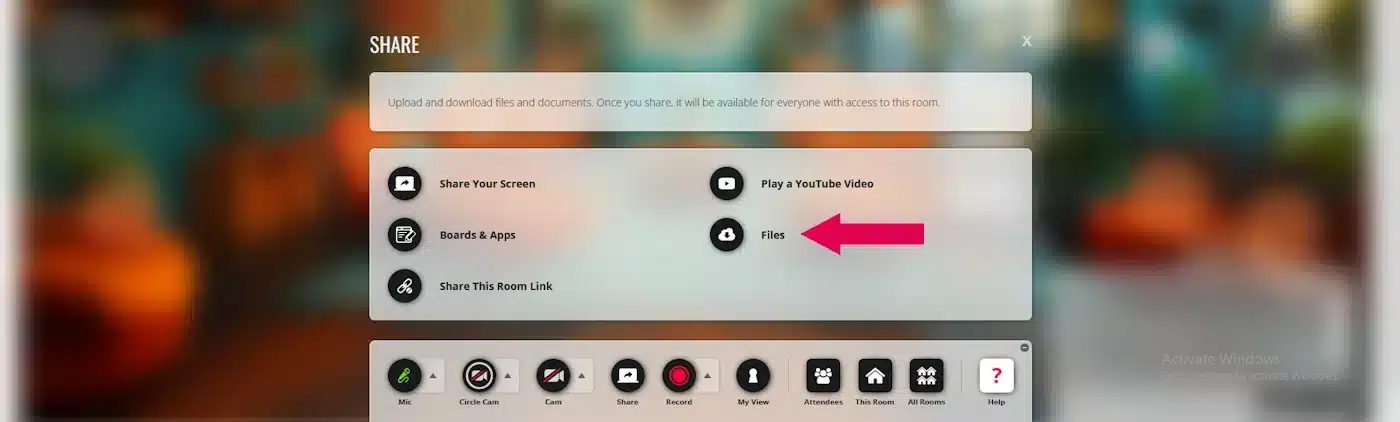
To share your files, just click on the “Share” circle like before. When the menu appears, select “Files,” which is shown by the pink arrow.

files 2nd image

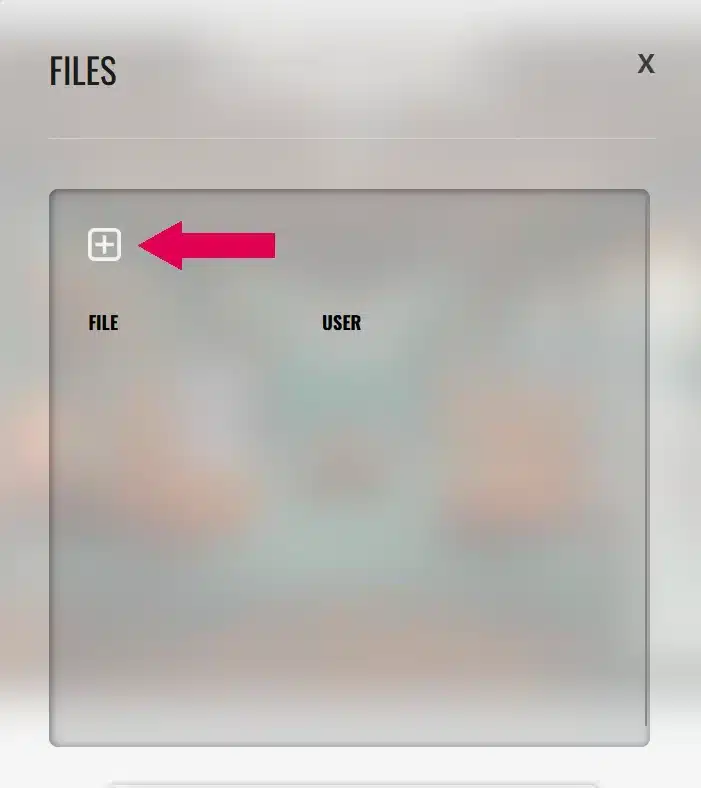
To add a file, click on the white box marked with an X, as shown by the pink arrow.

files 3rd image

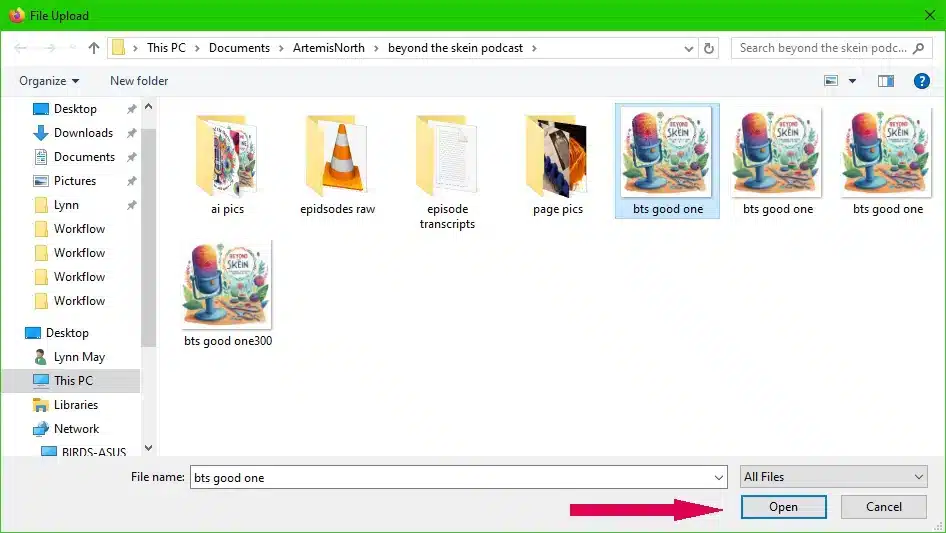
Choose which file you want to upload and click, "Open" as shown by the pink arrow.

files 4th image

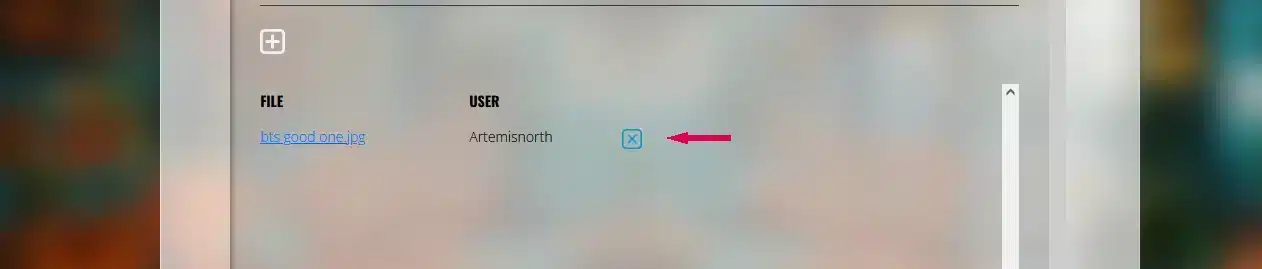
To delete your files, simply click on the white box that contains an X as shown by the pink arrow.

files 5th image

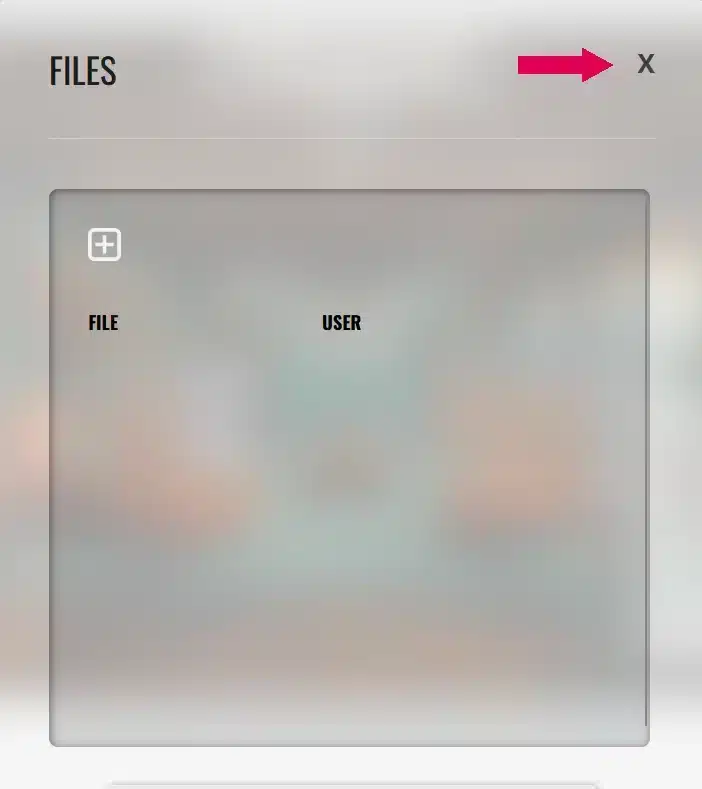
To close the file sharing window simply click the "X" at the top right of the window as shown by the pink arrow.

- Back to Top -

I think we are all going to have some fun!! 

Until next time friends...
welldone